CompfestCTF: v20 ABE Offline Decryption
Looks like non-pwn writeups are becoming more common here these days, and I think I found my new favourite CTF category: Forensics. This weekend I attended Compfest CTF as a member of joint effort from idktheflag and THEM?! teams. I ended up spending a lot of time in Forensics challenges, and I loved it! In one of the challenges - intern - we are given some dumps and asked 30 questions! We couldn’t solve it in time, but I learned new things that I want to document here.
This won’t be like my usual writeups focusing on the challenge, rather I will focus on one specifc topic I learned: v20 Application Bound Encryption (ABE) and DPAPI. In summary: I heard you like encryption, so we put encryption in your encrypted encryption keys.
Background
This is more like a documentation of what I learned so I can come back to this page in future if I find myself asking, wtf is v20 ABE? . So I will be summarizing what I learned from my perspective, if you think something doesn’t sound right, you are probably right :)
v20 ABE
Google says, v20 ABE came out with Chrome 127. Chromium based browsers use v20 ABE to store critical data encrypted in disk like login passwords, cookies, tokens so if some malware gets access to your hard drive, they can’t read your passwords and cookies in plaintext. To encrypt this data, browser needs an encryption key, and if they store that encryption key directly, malicious software can read that and decrypt the encrypted data. So what do we do? We encrypt the encryption key, not once, twice! Well technically browser don’t do that, browser uses Windows API, DPAPI, and Windows itself encrypts that key twice, browser don’t know how and with what Windows encrypts this v20 key. So browser only stores this double protected v20 encryption key in disk, and uses Windows API to unprotect it when it needs to decrypt some data. Windows API knows that the browser initiated this protection, so that key is bound to that browser and only unprotect requests coming from that browser will be fulfilled, and hence it is named application bound encryption.
Microsoft Edge Login Data and Local State
Microsoft Edge was the browser used in the given memory dumps in the challenge. Since it is also chromium based, Edge uses v20 ABE to encrypt login data which we needed to decrypt to answer one of the questions in the challenge. Login data is stored as a database file in C:\Users\YourUsername\AppData\Local\Microsoft\Edge\User Data\Default\Login Data Looking at this database will reveal the saved login data in logins table:
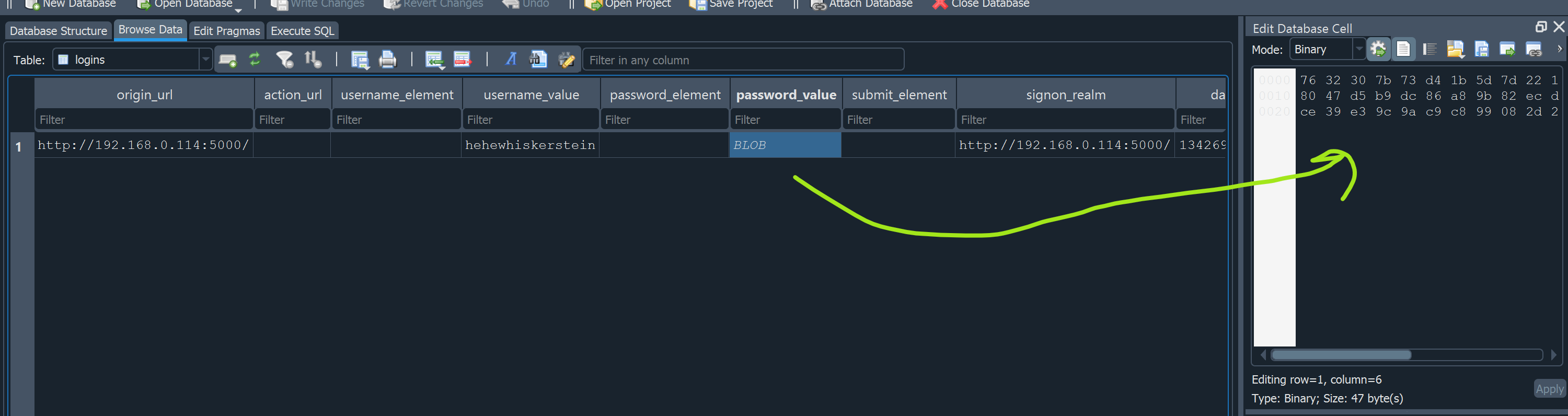
We can see the username saved in plainttext but password looks like encrypted. First three bytes of that blob tells us which encryption methodology used, in this case we have 763230 -> v20 in ASCII. Rest of the bytes contain:
1
2
v20     IV                       Encrypted Data                   Auth Tag
763230 7b73d41b5d7d2215b3181ae3 c98047d5b9dc86a89b82ecd1e6e385ac fece39e39c9ac9c899082d2fb1ea889e
Encryption is AES-GCM, if we can get the encryption key decrypting is straightforward. But where is the encryption key? It is in Local State file in : C:\Users\YourUsername\AppData\Local\Microsoft\Edge\User Data\Local State This file is in plaintext JSON file. Double encrypted encryption key for v20 can be found in os_crypt['app_bound_encrypted_key'] :

It is stored with base64 encoding. After base64 decoding, you will get a mix of readable data and encrypted data. It is in the form of DPAPI protected blob. It sounds fancy, but essentially it is a combination of encrypted data with a plaintext header to inform what is used to encrypt that data:
1
2
3
4
5
6
7
8
import base64
app_blob = 'QVBQQgEAAADQjJ3fARXREYx6AMBPwpfrAQAAAIXF+WCZ1nZMt+fRjnKxYn8QAAAAHgAAAE0AaQBjAHIAbwBzAG8AZgB0ACAARQBkAGcAZQAAABBmAAAAAQAAIAAAAF3Ty/K8buoyl11zFcfc2gxJ7qq8au67bBJ7//6c2bh/AAAAAA6AAAAAAgAAIAAAAIC/2JTnAR/l/npg3quOR7uKZKGAs8G/sZ9bZhMcy2AaUAEAAAlUtlAA/oyYRQOxoZPFdtWNeDYiP990jlCCBrvwmXbyU4cMLcRYDSbKEz+I3iVGnfDm6xB3QICUOLX9XdcfP2tZb79qJNarTF0sJMp2l7t5PLIQKczhIsFsobmteo9NpPUf89CWhlfeRGdIEwbXnGqJoDRaXCDgmnwdz0KTECGWyTABiZLt2sNXlGcch5oEJ1nZhqf4cBj8pY/AeITrNx+ZWgT3zWCIUY8wItrxw7LC07B9iEPCEcJvNKb0nDwGej5qsATbspNyC/7oJYMTjNjDaCs78rMpnJFcTZqiLRSGvvoz/u920W+54lBSPHkbqtHxuFBC+zTW9xB1uLmbWirpif0HO3BvGqpeG8po0efJL8xX/y37RaLrZvQSO4OSgyNChSCcIVp5NlmjgMmwi6KpGQxGxG3nCJpikh995CgOLX71iJ7LrROPvIDU3Q7++kAAAADD5b3F0pxryPRgSJFjxd9rdjH8uU8Y3M+nvrHCSCp0Lo0Es6CU2WskUWghThXFh8Hug6M5t/Lz6sUfpKeteSOl'

decoded = base64.b64decode(app_blob)

# You will see someting like:
# b'APPB\x01\x00\x00\x00\xd0\x8c\x9d\xdf\x01\x15\xd1\x11\x8cz\x00.....'
print(decoded)
Pypykatz, impacket dpapi.py or similar tools have easier ways to view what these blobs contain. But note that, this blob has this extra string APPB at the beginning, before using the tools, strip those 4 bytes! Like for example using impacket dpapi in python:
1
2
3
4
5
6
7
8
9
10
11
12
13
14
15
16
17
18
19
20
21
22
from impacket.dpapi import import DPAPI_BLOB
import base64

app_blob = 'QVBQQgEAAADQjJ3fARXREYx6AMBPwpfrAQAAAIXF+WCZ1nZMt+fRjnKxYn8QAAAAHgAAAE0AaQBjAHIAbwBzAG8AZgB0ACAARQBkAGcAZQAAABBmAAAAAQAAIAAAAF3Ty/K8buoyl11zFcfc2gxJ7qq8au67bBJ7//6c2bh/AAAAAA6AAAAAAgAAIAAAAIC/2JTnAR/l/npg3quOR7uKZKGAs8G/sZ9bZhMcy2AaUAEAAAlUtlAA/oyYRQOxoZPFdtWNeDYiP990jlCCBrvwmXbyU4cMLcRYDSbKEz+I3iVGnfDm6xB3QICUOLX9XdcfP2tZb79qJNarTF0sJMp2l7t5PLIQKczhIsFsobmteo9NpPUf89CWhlfeRGdIEwbXnGqJoDRaXCDgmnwdz0KTECGWyTABiZLt2sNXlGcch5oEJ1nZhqf4cBj8pY/AeITrNx+ZWgT3zWCIUY8wItrxw7LC07B9iEPCEcJvNKb0nDwGej5qsATbspNyC/7oJYMTjNjDaCs78rMpnJFcTZqiLRSGvvoz/u920W+54lBSPHkbqtHxuFBC+zTW9xB1uLmbWirpif0HO3BvGqpeG8po0efJL8xX/y37RaLrZvQSO4OSgyNChSCcIVp5NlmjgMmwi6KpGQxGxG3nCJpikh995CgOLX71iJ7LrROPvIDU3Q7++kAAAADD5b3F0pxryPRgSJFjxd9rdjH8uU8Y3M+nvrHCSCp0Lo0Es6CU2WskUWghThXFh8Hug6M5t/Lz6sUfpKeteSOl'

decoded = base64.b64decode(app_blob)

blob = DPAPI_BLOB(decoded[4:])
blob.dump()

# Or in pypykatz
# from pypykatz.dpapi.structures.blob import DPAPI_BLOB
# blob =  DPAPI_BLOB.from_bytes(decoded[4:])
# print(f"DPAPI Version: {blob.version}")
# print(f"Provider GUID: {blob.credential_guid}")
# print(f"MasterKey GUID: {blob.masterkey_guid}")
# print(f"MasterKey Version: {blob.masterkey_version}")
# print(f"Crypt Algorithm ID: {blob.crypto_algorithm}")
# print(f"Hash Algorithm ID: {blob.hash_algorithm}")
# print(f"Description: {blob.description}")
# print(f"Encrypted Data Length: {blob.data_length}")
# print(f"Encrypted Data (Hex): {blob.data.hex()[:10]}...")
One of the important fields in that blob is masterkey_guid field. That field tells us which master key is used to encrypt this block.
DPAPI Master Keys
In previous section, I hinted that masterkey GUID field was important. It points us to which masterkey we need to find and use to decrypt/unprotect that blob. DPAPI uses protect/unprotect in place of encrypt/decrypt, they just like fancy words don’t they :) But what are master keys? They are encryption keys managed by DPAPI. As far as I understand, there are two types of masterkeys: User Masterkey and System Masterkey. User masterkey is based on the SID of the logged in user, while system masterkey is shared across user accounts, kind of. Encrypted versions of these master keys are stored in these folder under their respective GUID file:
1
2
User:    C:\Users\USER_NAME\AppData\Roaming\Microsoft\Protect\SID_OF_USER\GUID
System:  C:\Windows\System32\Microsoft\Protect\SYSTEM_ID\GUID
GUID we see from the encrypted blob, points to one of the files in these locations. There could be multiple files there, since windows refreshes these keys every three months, but the one we need can easily be identified by the matching GUID. These files contain the encrypted master key with additional stuff, like backup keys, encryption algorithm, length etc Don’t ask me what backup keys are for, I can’t answer that. To see a nice display of what these files contain, impacket’s dpapi.py can be used:
1
2
3
4
5
6
7
8
9
10
11
12
13
14
15
16
17
18
19
20
21
22
from impacket.dpapi import MasterKeyFile, MasterKey, deriveKeysFromUser, deriveKeysFromUserkey

user_mkf = "d5ebd623-ea07-49bc-8e89-fb56ff143327"
syst_mkf = "60f9c585-d699-4c76-b7e7-d18e72b1627f"

fp = open(syst_mkf, "rb")
data = fp.read()
mkf= MasterKeyFile(data)
mkf.dump()

# You can easily reach encrypted part and then encrypted masterkey from file
enc_data = data[len(mkf):]
mk = MasterKey(enc_data[:mkf['MasterKeyLen']])

[MASTERKEY]
Version     :        2 (2)
Salt        : b'26384752ca0d14536a46fe2813e7e924'
Rounds      :     1f40 (8000)
HashAlgo    : 0000800e (32782) (CALG_SHA_512)
CryptAlgo   : 00006610 (26128) (CALG_AES_256)
data        : b'9c4897c8985f460c4337a9f0744a9d22c12926476d9c8551f394b4766b6ac5986a1a1cf24dc9deadbfc835ac5beb291a202552fcae3eae84be64cb1e58504d7c80f4cfe4cec090749a30cdc4d689553adb54b89e59f35c371675e0c905a8eff1eb3c6094a256034b8f2bf4e877829146aa7d456e35d702e97a38bb74096e5296ef0933c4b6778714730263008eabe411'
Impacket’s dpapi.py script can also be used to process and decrypt masterkey files, but due to some bugs in the code, I spent a lot of time going around circles ;-; So I decided script everything myself rather than relying on tools without knowing how it works.
Okay now here comes the tricky part, we know they are encrypted, but how do we actually get decrypted master keys? DPAPI uses pre-keys to encrypt masterkeys, and pre keys are generated based on user related or machine related hashes, passwords etc. So depending on the type of masterkey, the information we need to extract from dumps change.
Removing Double Protection
I tried to summarize my understanding of how DPAPI protection system works, now I will show how I managed to remove the double protection. Double protection can be summarized in simple terms:
1
app_bound_blob = encrypt(encrypt(v20_blob, USER_MK), SYSTEM_MK)
So if we look from the reverse order, we need to first remove SYSTEM masterkey protection from app_bound_encrypted_key blob. This can also be seen by where the referenced GUID comes from. In this case 60f.. GUID was coming from system32 protect folder, so it is a SYSTEM masterkey file.
Removing SYSTEM Masterkey Protection
Removing SYSTEM masterkey protection, means decrypting app_bound blob with SYSTEM masterkey. GUID file contains the encrypted masterkey, so we need to first find its decrypted version. Two ways we can go for this one:
Use pypykatz, mimikatz or other tools to extract from lsass’s minidump. These tools know the structure of decrypted keys and signatures so they process the memory dumps to find decrypted versions.
Generate the pre key that is used to encrypt masterkey
I initially went with first way, but there was a problem. Extracted key didn’t work. I spent hours trying to figure out and couldn’t understand why it didn’t work. After CTF ended some kind person linked me this article from the maintainer of pypykatz: https://skelsec.medium.com/lsass-needs-an-iv-57b7333d50d8#:~:text=decrypted%20with%20an%20%E2%80%9C-,incorrect,-%E2%80%9D%20IV IV extracted from the dump was wrong :( And hence first 8 bytes of decrypted keys were wrong. So I left this here, and went with generating pre keys.
Generating pre key depends on the master key and there are a few different ways they are generated. This diagram from https://github.com/skelsec/pypykatz/wiki/dpapi gives quite a good summary of different ways:
1
2
3
4
5
6
7
8
9
10
11
12
13
14
15
16
17
18

                 │
  SID + Password │
      - or -     │
  SID + NT hash  │                                      │
      - or -     │ ────►  prekey +  masterkey file  ───►│
  Registry hive  │                                      │
      - or -     │                                      │                                           │
    LSASS dump   │                                      │                           BLOB (file)     │
                 │                                      │     masterkey      │         - or -       │
                                                        ├────►  - or -     ──┼──    Securestring    │  ────► Secrets
               - or -                                   │      backupey      │         - or -       │
                                                        │                        Credentials (file) │
            LSASS dump    ────────────────────────────► │                                           │
                                                        │                                           │
                                                        │
                                                        │
I will now focus on the ways I used to decrypt masterkey files, instead of failed attempts. Going back to actual topic, we are trying to decrypt system masterkey file. For this one I needed:
- SYSTEM registry hive
- SECURITY registry hive
Both of which can be easily extracted from the provided ad1 dumps. They contain the relevant hashes and bootkey to generate the required pre key:
1
2
3
4
5
6
7
8
9
10
11
12
13
14
15
16
17
18
19
20
21
22
from impacket.examples.secretsdump import LocalOperations, LSASecrets

secrets = {}
def getDPAPI_SYSTEM(secretType, secret):
    if secret.startswith("dpapi_machinekey:"):
        machineKey, userKey = secret.split('\n')
        machineKey = machineKey.split(':')[1]
        userKey = userKey.split(':')[1]
        secrets['MachineKey'] = unhexlify(machineKey.removeprefix("0x"))
        secrets['UserKey'] = unhexlify(userKey.removeprefix("0x"))

def getLSA(system, security):
    localOperations = LocalOperations(system)
    bootKey = localOperations.getBootKey()
    lsaSecrets = LSASecrets(security, bootKey, None, isRemote=False, history=False, perSecretCallback = getDPAPI_SYSTEM)
    lsaSecrets.dumpSecrets()

system_hive = 'SYSTEM'
security_hive = 'SECURITY'

getLSA(system_hive, security_hive)
print(secrets)
This will generate the machine and user key required to decrypt the masterkey file. If you look at where the masterkey file we are decrypting comes from it was udner Window’s protect folder under User folder. That means, we will need to use User key from the dumped secrets to decrypt this masterkey file:
1
2
3
decryptedKey = mk.decrypt(secrets['UserKey'])
print('Decrypted key with UserKey')
print('Decrypted key: 0x%s' % hexlify(decryptedKey).decode('latin-1'))
So in summary, we used system and security hives to generate pre keys, and then used User key to decrypt the masterkey file. This gave us the SYSTEM master key we need to use to decrypt/unprotect the app_bound blob. Now we can use that key to decrypt the blob:
1
2
system_decrypted_blob = blob.decrypt(decryptedKey, entropy= None)
print(system_decrypted_blob)
Removing USER Masterkey Protection
This part is a bit more complicated than SYSTEM. User masterkey file now contains USER masterkey encrypted by using User’s password! As far as I understand, just from disk dump, we can’t extract the key to decrypt this masterkey file, while in previous one we managed to decrypt it by using registry hive dumps. This time we need to use the memory dump to extract some extra stuff:
Directly extract decrypted USER masterkey from lsass dump. I forgot if I mentioned this, but IV issues prevented me going through this part, first 8 bytes of extracted keys were wrong!
Discover User’s password somehow from the dump
Extract NT hash from dump
If first option worked, we could extract already decrypted user masterkey, but it didn’t so I had to generate prekey used to encrpy user masterkey. That key can be generated either with password or NT hash. I couldn’t find a way to recover password, so I needed to get NT hash from the dump. Two tools I tried:
Memprocfs version <= 5.8 After this version, they removed the ability to generate lsass minidumps intentionally for safety. But older versions are still available in the git, though you have to build it yourself.
Volatility pypykatz pluging: https://github.com/skelsec/pypykatz-volatility3. This is more direct and easier:
1
vol -f "{12b27ea2-0101-4435-a4af-5a8743ce345f}.elf" -r json -p ~/pypykatz-volatility3/ pypykatz
This will extract the login msv credentials like NT Hash, SHA Hash and DPAPI master keys. WHATEVER YOU DO, DONT TRUST DPAPI KEYS At least for this challenge. I ended up using user’s SHAHash:
1
2
    "NThash": "d58b6e8440e1e6400a97a7b1022163b9",
    "SHAHash": "5747ad7437fb64f3588be29e3af043b37273ef99",
This SHA hash can be used with impacket dpapi to generate prekeys that can be used to decrypt the user masterkey file. And then that decrypted key can be used to unprotect/decrypt the blob from previous stage:
1
2
3
4
5
6
7
8
9
10
11
12
13
14
15
16
17
18
19
20
21
22
23
sid = "S-1-5-21-1173333265-278651773-1300844780-1001"
shahash = "5747ad7437fb64f3588be29e3af043b37273ef99"
shakey = unhexlify(shahash)

prekey = deriveKeysFromUserkey(sid, shakey)[0]

# Again read the relevan encrypted key part from masterkey file
fp   = open(user_mkf, "rb")
data = fp.read()
mkf = MasterKeyFile(data)
mkf.dump()
enc_data = data[len(mkf):]
mk = MasterKey(enc_data[:mkf['MasterKeyLen']])

decryptedKey = mk.decrypt(prekey)
print('Decrypted key with SID + SHAHash')
print('Decrypted key: 0x%s' % hexlify(decryptedKey).decode('latin-1'))

# Now unprotect USER DPAPI protection
intermediate_blob = DPAPI_BLOB(system_decrypted_blob)
intermediate_blob.dump()
user_decrypted_blob = intermediate_blob.decrypt(decryptedKey, entropy= None)
print(user_decrypted_blob)
It is a similar process to previous stage, just with new stuff. User SID can be easily found from the disk dump. SHAHash is extracted using one of the memory dump processing tools. And the rest is same, read masterkey file, extract encrypted key, generate prekey by using SID + SHAhash, decrypt the masterkey file and then use that masterkey to decrypt the blob from previous stage. If everything went well, we should now have v20 key:
1
2
3
b' \x00\x00\x00\x02C:\\Program Files\\Microsoft\\Edge \x00\x00\x00\xc4Y\xa8\x15\x02R*(\xcc4IX\x17\xba\x0f\x93\x0es\xf5\xb1\x9a\xb0:0h\xcc\xc0y\x02<\xb6v'

2000000002433a5c50726f6772616d2046696c65735c4d6963726f736f66745c4564676520000000c459a81502522a28cc34495817ba0f930e73f5b19ab03a3068ccc079023cb676
Yattaaa, yattaaa, we got the blob decrypted. This blob contains the AES key used by Microsoft Edge to encrypt Login Data.
Login Data decryption
Looking at the decrypted blob, we can see there are a few extra header stuff in there:
1
2
3
4
5
20000000 -> LE length = 32 bytes
02 -> Path type = 2 -> system wide install (Program Files)
433a5c50726f6772616d2046696c65735c4d6963726f736f66745c45646765 -> Path string = 32 bytes
20000000  -> Key length = 32 bytes
c459a81502522a28cc34495817ba0f930e73f5b19ab03a3068ccc079023cb676 -> 32 bytes AES GCM key
This gives us the AESGCM key we need to decrypt the encrypted login data blob we extracted at the beginning of this writeup:
1
2
v20     IV                       Encrypted Data                   Auth Tag
763230 7b73d41b5d7d2215b3181ae3 c98047d5b9dc86a89b82ecd1e6e385ac fece39e39c9ac9c899082d2fb1ea889e
Now all we need to do is extract the key from the blob, and use that to decrypt the encrypted data+tag:
1
2
3
4
5
6
7
8
9
10
11
12
13
14
15
16
17
18
19
20
21
22
23
24
25
26
27
28
29
30
31
32
33
34
35
36
37
38
39
40
41
42
def parse_v20_key(key_hex: str) -> bytes:
    key_bytes = bytes.fromhex(key_hex.replace(" ", ""))

    offset = 0
    # struct.unpack_from returns a tuple, so we grab the first element [0]
    path_len = struct.unpack_from("<I", key_bytes, offset)[0]
    offset += 4 + path_len  # Skip length prefix and the path block

    key_len = struct.unpack_from("<I", key_bytes, offset)[0]
    offset += 4

    # Extract the raw 32-byte AES key
    aes_key = key_bytes[offset:offset + key_len]
    return aes_key

def decrypt_v20_data(encrypted_hex: str, aes_key: bytes) -> str:
    # Decrypts AES-GCM data using the parsed v20 key block.
    encrypted_bytes = bytes.fromhex(encrypted_hex.strip())

    # v20 Structure: 3 bytes prefix ('v20') + 12 bytes IV + (Ciphertext + 16 bytes Tag)
    prefix = encrypted_bytes[:3]
    iv = encrypted_bytes[3:15]
    ciphertext_with_tag = encrypted_bytes[15:]

    # Decrypt via AES-GCM
    aesgcm = AESGCM(aes_key)
    decrypted_bytes = aesgcm.decrypt(iv, ciphertext_with_tag, None)

    return decrypted_bytes.decode('utf-8', errors='replace')

try:
    # 1. Extract AES key
    aes_key = parse_v20_key(user_decrypted_blob.hex())
    print(f"Extracted AES Key: {aes_key.hex()}")

    # 2. Decrypt data
    decrypted_password = decrypt_v20_data(encrypted_login_hex, aes_key)
    print(f"Decrypted Login Data:   {decrypted_password}")

except Exception as e:
    print(f"Decryption failed: {e}")
And finally this gives us the password: .v4SQ4Ls&9dUi-wz
Final Code
If you want to see the full script you can find it here with a bit more cleaning done:
1
2
3
4
5
6
7
8
9
10
11
12
13
14
15
16
17
18
19
20
21
22
23
24
25
26
27
28
29
30
31
32
33
34
35
36
37
38
39
40
41
42
43
44
45
46
47
48
49
50
51
52
53
54
55
56
57
58
59
60
61
62
63
64
65
66
67
68
69
70
71
72
73
74
75
76
77
78
79
80
81
82
83
84
85
86
87
88
89
90
91
92
93
94
95
96
97
98
99
100
101
102
103
104
105
106
107
108
109
110
111
112
113
114
115
116
117
118
119
120
121
122
123
124
125
126
127
128
129
130
131
132
import struct
import base64
from cryptography.hazmat.primitives.ciphers.aead import AESGCM
from binascii import unhexlify, hexlify
from impacket.dpapi import MasterKeyFile, MasterKey, deriveKeysFromUser, deriveKeysFromUserkey, DPAPI_BLOB
from impacket.examples.secretsdump import LocalOperations, LSASecrets

# Extracted from Local State file
app_blob = 'QVBQQgEAAADQjJ3fARXREYx6AMBPwpfrAQAAAIXF+WCZ1nZMt+fRjnKxYn8QAAAAHgAAAE0AaQBjAHIAbwBzAG8AZgB0ACAARQBkAGcAZQAAABBmAAAAAQAAIAAAAF3Ty/K8buoyl11zFcfc2gxJ7qq8au67bBJ7//6c2bh/AAAAAA6AAAAAAgAAIAAAAIC/2JTnAR/l/npg3quOR7uKZKGAs8G/sZ9bZhMcy2AaUAEAAAlUtlAA/oyYRQOxoZPFdtWNeDYiP990jlCCBrvwmXbyU4cMLcRYDSbKEz+I3iVGnfDm6xB3QICUOLX9XdcfP2tZb79qJNarTF0sJMp2l7t5PLIQKczhIsFsobmteo9NpPUf89CWhlfeRGdIEwbXnGqJoDRaXCDgmnwdz0KTECGWyTABiZLt2sNXlGcch5oEJ1nZhqf4cBj8pY/AeITrNx+ZWgT3zWCIUY8wItrxw7LC07B9iEPCEcJvNKb0nDwGej5qsATbspNyC/7oJYMTjNjDaCs78rMpnJFcTZqiLRSGvvoz/u920W+54lBSPHkbqtHxuFBC+zTW9xB1uLmbWirpif0HO3BvGqpeG8po0efJL8xX/y37RaLrZvQSO4OSgyNChSCcIVp5NlmjgMmwi6KpGQxGxG3nCJpikh995CgOLX71iJ7LrROPvIDU3Q7++kAAAADD5b3F0pxryPRgSJFjxd9rdjH8uU8Y3M+nvrHCSCp0Lo0Es6CU2WskUWghThXFh8Hug6M5t/Lz6sUfpKeteSOl'

# Extracted from Login Data database
encrypted_login_hex = "7632307b73d41b5d7d2215b3181ae3c98047d5b9dc86a89b82ecd1e6e385acfece39e39c9ac9c899082d2fb1ea889e"

# Extract these from the given ad1 dumps
sid = "S-1-5-21-1173333265-278651773-1300844780-1001"
user_mkf = "d5ebd623-ea07-49bc-8e89-fb56ff143327"
syst_mkf = "60f9c585-d699-4c76-b7e7-d18e72b1627f"
system_hive = 'SYSTEM'
security_hive = 'SECURITY'

# Extracted from memory dump using pypykatz or similar
shahash = "5747ad7437fb64f3588be29e3af043b37273ef99"
secrets = {}

def parse_v20_key(key_hex: str) -> bytes:
    key_bytes = bytes.fromhex(key_hex.replace(" ", ""))

    offset = 0
    # struct.unpack_from returns a tuple, so we grab the first element [0]
    path_len = struct.unpack_from("<I", key_bytes, offset)[0]
    offset += 4 + path_len  # Skip length prefix and the path block

    key_len = struct.unpack_from("<I", key_bytes, offset)[0]
    offset += 4

    # Extract the raw 32-byte AES key
    aes_key = key_bytes[offset:offset + key_len]
    return aes_key

def decrypt_v20_data(encrypted_hex: str, aes_key: bytes) -> str:
    # Decrypts AES-GCM data using the parsed v20 key block.
    encrypted_bytes = bytes.fromhex(encrypted_hex.strip())

    # v20 Structure: 3 bytes prefix ('v20') + 12 bytes IV + (Ciphertext + 16 bytes Tag)
    prefix = encrypted_bytes[:3]
    iv = encrypted_bytes[3:15]
    ciphertext_with_tag = encrypted_bytes[15:]

    # Decrypt via AES-GCM
    aesgcm = AESGCM(aes_key)
    decrypted_bytes = aesgcm.decrypt(iv, ciphertext_with_tag, None)

    return decrypted_bytes.decode('utf-8', errors='replace')

# These two functions are mostly copied from impacket's DPAPI example script
def getDPAPI_SYSTEM(secretType, secret):
    if secret.startswith("dpapi_machinekey:"):
        machineKey, userKey = secret.split('\n')
        machineKey = machineKey.split(':')[1]
        userKey = userKey.split(':')[1]
        secrets['MachineKey'] = unhexlify(machineKey.removeprefix("0x"))
        secrets['UserKey'] = unhexlify(userKey.removeprefix("0x"))

def getLSA(system, security):
    localOperations = LocalOperations(system)
    bootKey = localOperations.getBootKey()
    lsaSecrets = LSASecrets(security, bootKey, None, isRemote=False, history=False, perSecretCallback = getDPAPI_SYSTEM)
    lsaSecrets.dumpSecrets()


# Decode app_bound_encrypted blob and see which masterkey it requires to decrypt
decoded  = base64.b64decode(app_blob)
blob = DPAPI_BLOB(decoded[4:])
blob.dump()

# From that blob we know it refers to this system masterkey file
# So we need to decrypt that file by generating prekey with UserKey
fp = open(syst_mkf, "rb")
data = fp.read()
mkf= MasterKeyFile(data)
mkf.dump()

# You can easily reach encrypted part and then encrypted masterkey from file
enc_data = data[len(mkf):]
mk = MasterKey(enc_data[:mkf['MasterKeyLen']])

getLSA(system_hive, security_hive)
print(secrets)

mk.dump()
decryptedKey = mk.decrypt(secrets['UserKey'])
print('Decrypted key with UserKey')
print('Decrypted key: 0x%s' % hexlify(decryptedKey).decode('latin-1'))

system_decrypted_blob = blob.decrypt(decryptedKey, entropy= None)
print(system_decrypted_blob)

shakey = unhexlify(shahash)
prekey = deriveKeysFromUserkey(sid, shakey)[0]

# Again read the relevan encrypted key part from masterkey file
fp   = open(user_mkf, "rb")
data = fp.read()
mkf = MasterKeyFile(data)
mkf.dump()
enc_data = data[len(mkf):]
mk = MasterKey(enc_data[:mkf['MasterKeyLen']])

decryptedKey = mk.decrypt(prekey)
print('Decrypted key with SID + SHAHash')
print('Decrypted key: 0x%s' % hexlify(decryptedKey).decode('latin-1'))

# Now unprotect USER DPAPI protection
intermediate_blob = DPAPI_BLOB(system_decrypted_blob)
intermediate_blob.dump()
user_decrypted_blob = intermediate_blob.decrypt(decryptedKey, entropy= None)

print(user_decrypted_blob)
print(user_decrypted_blob.hex())

try:
    # 1. Extract AES key
    aes_key = parse_v20_key(user_decrypted_blob.hex())
    print(f"Extracted AES Key: {aes_key.hex()}")

    # 2. Decrypt data
    decrypted_password = decrypt_v20_data(encrypted_login_hex, aes_key)
    print(f"Decrypted Login Data:   {decrypted_password}")

except Exception as e:
    print(f"Decryption failed: {e}")
Final Notes
You really don’t need a script like this to solve this really. All the tools I mentioned here has command line interfaces that you can use quickly to get keys and decryption done. For AESGCM, I think cyber chef can be used once you get the key and IV. I wanted to understand what happens behind the scenes of tool calls. I find this way more informative for myself, so I spent some extra time after I got the password to understand and record how this actually works. Not sure if this will ever come up in my life, but I feel like I learned something very interesting and cool about how login data is stored by browser securely.
It is time to close this page and move onto new challenges. As always, keep learning!